Today, we're announcing Alpaca's MCP Server Version 2 (V2), a complete rebuild designed for scale and maintainability. V2 expands tool coverage from 43 to 61 endpoints, introduces toolset filtering to control what your AI assistant can access, and uses OpenAPI specs to stay automatically in sync with Alpaca's Trading API. https://alpaca.markets/blog/alpaca-launches-mcp-server-v2
What's New in V2?
- More capabilities: V2 supports 61 actions compared to V1's 43. New endpoints include order replacement, full option chain browsing, market screeners, account activity history, and more.
- Easier onboarding: Add your API keys to your MCP client config and restart. No init commands or additional configuration needed. When used with AI coding IDE like Cursor, set it up by copying the GitHub link to clone it easily.
- Granular control: The new ALPACA_TOOLSETS setting lets you limit the server to specific capabilities. For example, you can choose only account info and order management or only market data endpoints. You have full control over what tools are accessible.
- Stays in sync with the Alpaca Trading API: V2 reads from Alpaca's published OpenAPI specs directly. When Alpaca's Trading API adds a new field or endpoint, V2 picks it up automatically without requiring a code change.
- Increased reliability: Fewer dependencies and direct REST API communication means less indirection and fewer potential failure points.
What is Alpaca’s MCP Server?
Alpaca's MCP Server connects Claude, Cursor, and major IDEs and MCP clients to Alpaca's Trading API through a unified interface. Once connected, your AI assistant can read account information, query live market data, and execute orders on your behalf, all from the chat window.
Here's what that looks like in practice:
- Check your account: Ask "What's my buying power?" or "Show me all my open positions" to get live data directly in the conversation.
- Research before trading: Request "Show me how AAPL performed this week" for daily price bars, or "What are the options Greeks for this TSLA put?" for delta, gamma, theta, vega, and IV all in plain English.
- Place and manage orders: Commands like "Buy 10 shares of NVDA at market" or "Set a stop-loss on my TSLA position at $300" execute directly. Stocks, options, and crypto orders are supported, including market, limit, stop, trailing stop, and multi-leg spreads.
- Monitor and react: Pull live screeners with "What are the most active stocks right now?" or track specific symbols like "BTC/USD orderbook" for bid/ask depth.
- Build watchlists: Create lists like "Tech Earnings with AAPL, MSFT, NVDA, and GOOGL" and track upcoming dividends or splits.
- Test strategies on paper: Use your paper trading API keys to iterate on strategies in the chat without risking capital. When ready, swap in your live keys.
Installation and Usage Demo
The History of the Alpaca MCP Server
V1: Hand-Crafted, Powerful, but Tightly Coupled
When we first built the Alpaca MCP Server in April of 2025, MCP itself was a young standard and the ecosystem was still taking shape. Our approach was straightforward: hand-write a Python function for every Alpaca Trading API endpoint we wanted to expose as a tool.
That meant custom input validation, custom parameter schemas, custom response formatters, and custom error handling, written once per endpoint, for each of the 43 tools we shipped. The result was a single server.py file just over 4,000 lines long.
V1 worked well. Users could trade stocks, options, and crypto, query market data, manage positions and watchlists, and pull portfolio history through natural language. The community responded with enthusiasm, and over 30 pull requests followed, adding coverage, fixing edge cases, and extending the server's reach. Additionally, there were 100+ forks, and hundreds of stars.
But V1 had a structural problem: it described Alpaca's Trading API in Python code. Every tool was a hand-written translation of what the Trading API accepted and returned. That meant every time the API changed - either a new field, a renamed parameter, or a new endpoint - the MCP server needed a corresponding code change. Nearly half of those 40+ PRs were reactive: not adding new features, but keeping pace with changes upstream.
The gap was always there. Between an API update and a merged PR, the server was out of date.
V2: The OpenAPI Spec as the Source of Truth
Alpaca already publishes machine-readable OpenAPI specs for the Trading API and Market Data API. These specs describe every endpoint, every parameter and every response schema in a format a program can read and act on.
The insight behind V2 is simple: stop describing the API in Python. Read the spec instead.
V2 uses FastMCP's from_openapi() function to parse Alpaca's OpenAPI specs at process startup and create in-memory MCP tools directly from them. No code generation step. No pre-build. No intermediate files. The server starts, reads the spec, and the tools exist.
The result: tool coverage grew from 43 to 61 tools — not because we wrote more code, but because the spec had endpoints V1 never got around to hand-crafting. Account activities, order replacement, full option chain, do-not-exercise instructions, market movers, and more — all available in V2 because the spec described them, and the server read the spec.
How the Architecture of Alpaca’s V2 MCP Server Works
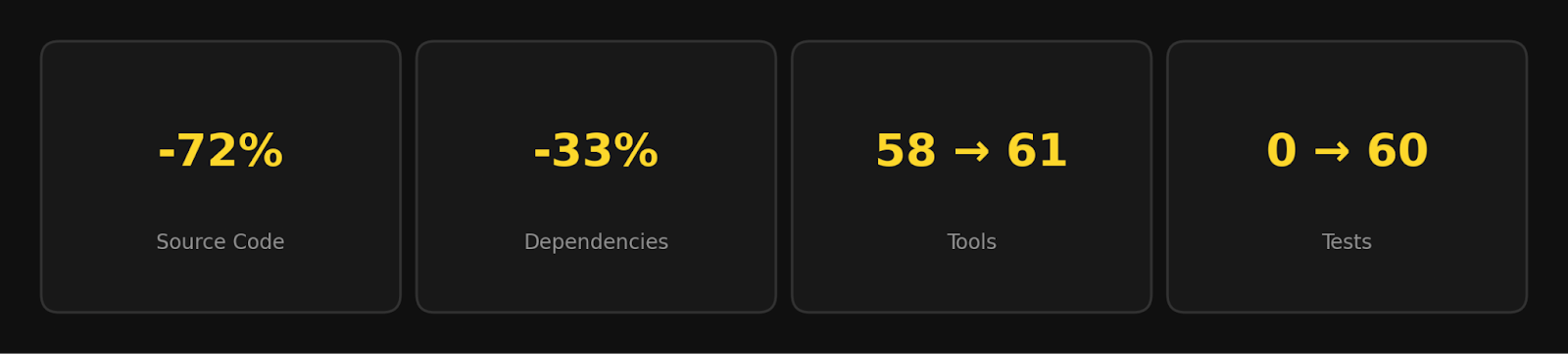
V2 is fundamentally different from V1 in its architecture. Instead of hand-writing Python functions for each endpoint, V2 reads Alpaca's OpenAPI specs at startup and generates tools directly from them. This approach unlocks three advantages.
Tools Generated from Specs
When the server starts, it loads Alpaca's bundled OpenAPI specs and constructs MCP tools directly from them. Each set of tools (Trading API, Market Data API) gets its own HTTP client configured with your API credentials. Tool generation runs in milliseconds at startup, and calling a tool becomes a direct HTTP pass-through to Alpaca's API.
Toolset Filtering for Precision
V2 maintains an explicit allowlist of operation IDs per named toolset. By default, all toolsets are active (account, trading, stock data, crypto data, options data, and more). Restrict what's available with a single environment variable:
{
  "env": {
    "ALPACA_TOOLSETS": "stock-data,crypto-data"
  }
}
With that setting, the server exposes only market data tools. This matters because MCP clients have limits on concurrent tools, and fewer tools reduce the likelihood of models selecting the wrong action.
Hand-Crafted Overrides for Complex Endpoints
Alpaca's order placement endpoint accepts fundamentally different request shapes depending on asset class: stocks support trailing stops and brackets; crypto uses GTC/IOC time-in-force and notional sizing; options can be single or multi-leg. A single auto-generated tool would be confusing for an LLM.
V2 excludes these endpoints from auto-generation and replaces them with hand-crafted tools:
- place_stock_order: market, limit, stop, stop-limit, trailing stop, bracket orders
- place_crypto_order: market, limit, stop-limit with GTC/IOC
- place_option_order: single-leg or multi-leg
Out of 61 tools, only a handful are hand-crafted. The rest come directly from the spec.
Staying Automatically in Sync
This project pulls directly from Alpaca’s API specifications. When the API changes, you can download the latest version.
From the root of the repository, run this in your terminal:
scripts/sync-specs.shAfter running the script, review the changes (for example, using git diff), update your allowlist if needed, and run your build or tests to confirm everything is working as expected. Existing endpoints require no changes, the spec change handles everything.
Continuous Integration (CI) checks this process on every push. If your allowlist references an endpoint that no longer exists in the specification, you’ll see an error during the build so you can correct it before deployment.
For a more detailed workflow, including automation guidance, see `AGENTS.md`.
Built for Reliability and Testing
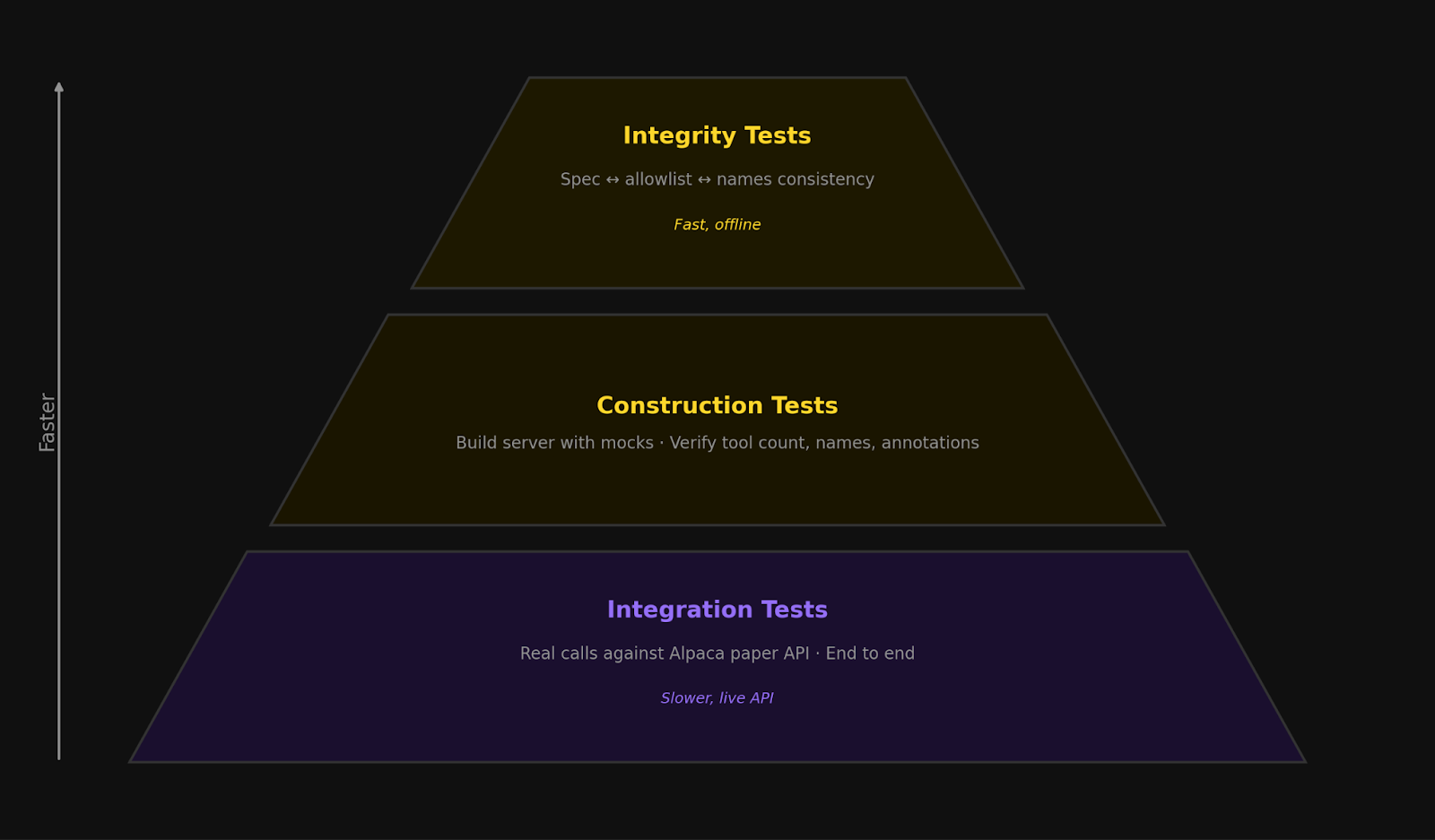
MCP servers are challenging to test because tools are generated at startup, they call external APIs, and the contract between the spec and code can drift silently. V2 uses a three-layer test suite to catch issues at every level.
- Integrity tests: Verify that the toolset allowlist, tool names, and OpenAPI specs are all in sync.
- Construction tests: Build the server with mock credentials and confirm the right tools are exposed.
- Integration tests: Run real calls against Alpaca's paper trading API end-to-end.
The first two layers need no credentials or network and run in seconds, catching the majority of issues: renamed endpoints, misconfigured toolsets, and silent schema mismatches. Integration tests handle the rest but only run on merges to main.
Important Considerations
- API Key Security: Your API keys are used to authenticate each request to Alpaca's Trading API. Keep them secure and never share them. Treat them like passwords.
- Order Execution Risk: Orders placed through the MCP Server execute directly against Alpaca's Trading API. Ensure you review any AI-generated order before confirming, as unintended orders can result in real financial loss.
- Latency and Slippage: Market orders may experience price slippage, especially for less liquid symbols or during high-volatility periods. Limit orders help control execution price but may not fill immediately.
- API Rate Limits: Alpaca's API has rate limits per account. Repeatedly querying market data or attempting high-frequency order placement may trigger rate limiting.
- Paper Trading for Testing: Test strategies on paper trading first. Paper trading uses the same API but does not execute real orders or affect real capital.
Get Started
To use Alpaca's MCP Server, you need an Alpaca Trading API account. Visit alpaca.markets to sign up, or log in to your existing account.
Both new and existing traders can learn more through our MCP Server documentation and API reference.
Still have questions? Contact us at [email protected] or visit our documentation portal.
Insights generated by our MCP server and connected AI agents are for educational and informational purposes only and should not be taken as investment advice. Any symbols referenced are for demonstration purposes and should not be considered investment advice. Alpaca does not recommend any specific securities or investment strategies. Past performance from models does not guarantee future results. Please conduct your own due diligence before making any decisions. All firms mentioned operate independently and are not liable for one another.
The content of this article is for general informational purposes only. All examples are for educational and illustrative purposes only.
Options trading is not suitable for all investors due to its inherent high risk, which can potentially result in significant losses. Please read Characteristics and Risks of Standardized Options before investing.
Fractional share trading allows a customer to buy and sell fractional share quantities and dollar amounts of certain securities. Fractional share trading presents unique risks and is subject to particular limitations that you should be aware of before engaging in such activity. See Alpaca Customer Agreement at https://alpaca.markets/disclosures for more details.
All investments involve risk and the past performance of a security, or financial product does not guarantee future results or returns. There is no guarantee that any investment strategy will achieve its objectives. Keep in mind that while diversification may help spread risk, it does not assure a profit, or protect against loss. There is always the potential of losing money when you invest in securities, or other financial products. Investors should consider their investment objectives and risks carefully before investing.
Cryptocurrency is highly speculative in nature, involves a high degree of risks, such as volatile market price swings, market manipulation, flash crashes, and cybersecurity risks. Cryptocurrency regulations are continuously evolving, and it is your responsibility to understand and abide by them. Cryptocurrency trading can lead to large, immediate and permanent loss of financial value. You should have appropriate knowledge and experience before engaging in cryptocurrency trading. For additional information, please click here.
Securities brokerage services are provided by Alpaca Securities LLC (dba "Alpaca Clearing"), member FINRA/SIPC, a wholly-owned subsidiary of AlpacaDB, Inc. Technology and services are offered by AlpacaDB, Inc.
Cryptocurrency services are made available by Alpaca Crypto LLC ("Alpaca Crypto"), a FinCEN registered money services business (NMLS # 2160858), and a wholly-owned subsidiary of AlpacaDB, Inc. Alpaca Crypto is not a member of SIPC or FINRA. Cryptocurrencies are not stocks and your cryptocurrency investments are not protected by either FDIC or SIPC. Please see the Disclosure Library for more information.
AlpacaDB, Inc., the parent company of Alpaca Securities LLC and Alpaca Crypto LLC, provides services and technology, including the brokerage infrastructure API supporting Alpaca’s financial services. This is not an offer, solicitation of an offer, or advice to buy or sell securities or cryptocurrencies or open a brokerage account or cryptocurrency account in any jurisdiction where Alpaca Securities or Alpaca Crypto, respectively, are not registered or licensed, as applicable.