By Chiranjeev Shah
This content is for educational and informational purposes only and should not be construed as investment advice, a recommendation, or an offer to buy or sell any securities or cryptocurrencies. Any strategies discussed are illustrative only and may not be suitable for all investors. This article reflects the experience of an individual user, is not representative of all customers, and should not be considered an endorsement or guarantee of future performance. The views and opinions expressed are those of the author and do not reflect or represent the views and opinions of Alpaca. Alpaca does not recommend any specific securities or investment strategies.The author was not compensated for this content but did receive nominal promotional items from Alpaca.
Personal Statement: Why I Built NightWatcher
I came into this from the trader's side first. I spent a lot of time around NQ futures and funded-account style discipline, and the deeper I got into markets, the more obvious it became that price alone does not tell the full story. Some market moves appear to be associated with identifiable catalysts, while others may be influenced by short-term sentiment, attention, or market activity.
That gap pulled me into algo trading. I kept seeing the same pattern: social sentiment would explode around a symbol, retail would pile in, and yet the move often had little durable reason behind it. I did not want to build a bot that blindly chased attention. I wanted to build a system that could pause, inspect the reason for the move, and only act when predefined criteria were met.
That’s why I built NightWatcher-V2 – to act as a personal filter. The first version was rough, useful, and fragile all at once. If one parser broke, the whole thing was compromised. Version 2 is a redesign that incorporates separated agents, execution boundaries, risk-management features, and a dashboard intended to improve transparency into system activity.
Alpaca became the natural execution layer because I needed developer-first broker infrastructure that let me move fast without wasting energy rebuilding order plumbing. Paper trading, API-first workflows, and support across asset classes meant I could stay focused on what actually matters: signal quality, policy enforcement, and learning when the correct trade is no trade at all.
What Is NightWatcher V2?
NightWatcher V2 is a multi-agent trading system built to combine fast signal detection with slower, more deliberate validation. Most retail sentiment tools identify trending activity. NightWatcher is designed to evaluate additional contextual information before a signal is considered for further review.
During market hours, the system watches for unusual sentiment and volume activity on equities, pushes those candidates through an LLM-based catalyst filter, and routes qualifying signals toward further review and potential execution.. When equities close, the same operating pattern can pivot to crypto monitoring so the system keeps working while the stock market sleeps.
The jump from V1 to V2 was mostly about structure. The first version was a monolithic architecture. V2 separates signal gathering, policy enforcement, execution, and monitoring into distinct parts so the system is easier to debug, monitor, and extend.
Paper-trading note: unless otherwise noted, the workflows and examples in this article should be understood as tested in Alpaca paper trading first. That makes the piece more credible and keeps experimentation separate from performance claims.
Why this matters: one design goal of the system is to reject signals that do not meet predefined criteria.
System Architecture
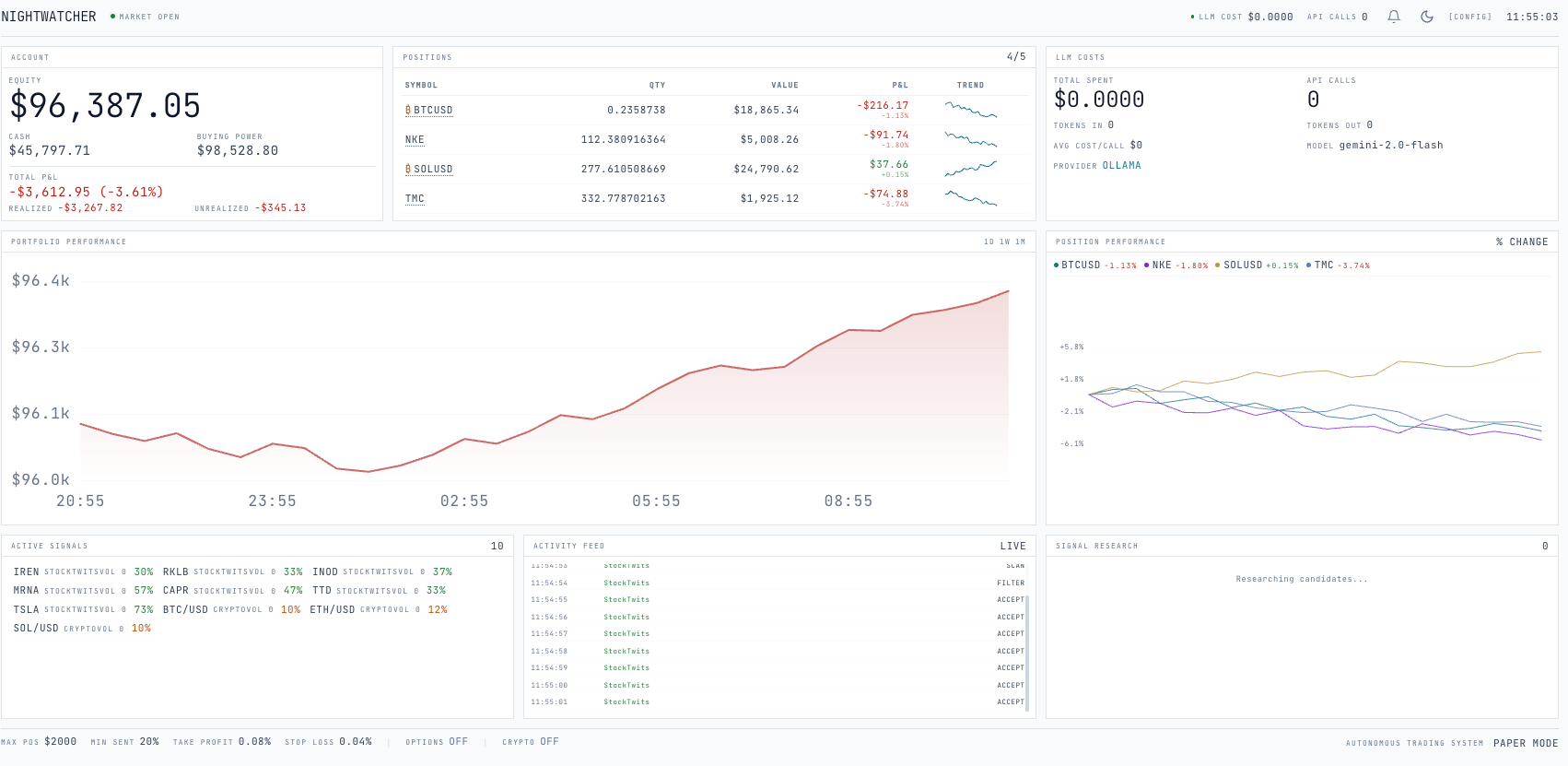
NightWatcher V2 has three main parts: the trading agent, the MCP server, and the dashboard. The trading agent is where research and decision-making happen. The MCP server is the policy and execution boundary. The dashboard makes the system observable in real time so you can see what the machine is doing instead of trusting a black box.
I think about architecture in human terms. The agent is the eyes and the analyst. It watches for sentiment spikes, collects context, and forms a view. The MCP server is the hands with rules: nothing gets executed until it passes a separate layer of risk checks and receives a time-limited approval token.
You can picture it like this:
- TRADING AGENT (Node.js)
- StockTwits / signal gathering
- LLM catalyst validation
- Position monitoring
- Buy / hold / sell decisions
- MCP SERVER (Cloudflare Workers)
- Policy engine
- Approval tokens
- Order preview / submit
- Alpaca routing
- DASHBOARD (React)
- Active signals
- Portfolio state
- Agent activity feed
- Overnight summary
This separation is intended to provide an additional layer of operational controls. The agent can decide it wants to trade, but it cannot directly bypass policy. Every order has to clear the MCP layer before it reaches Alpaca, which applies predefined controls before orders can be submitted.
Example:
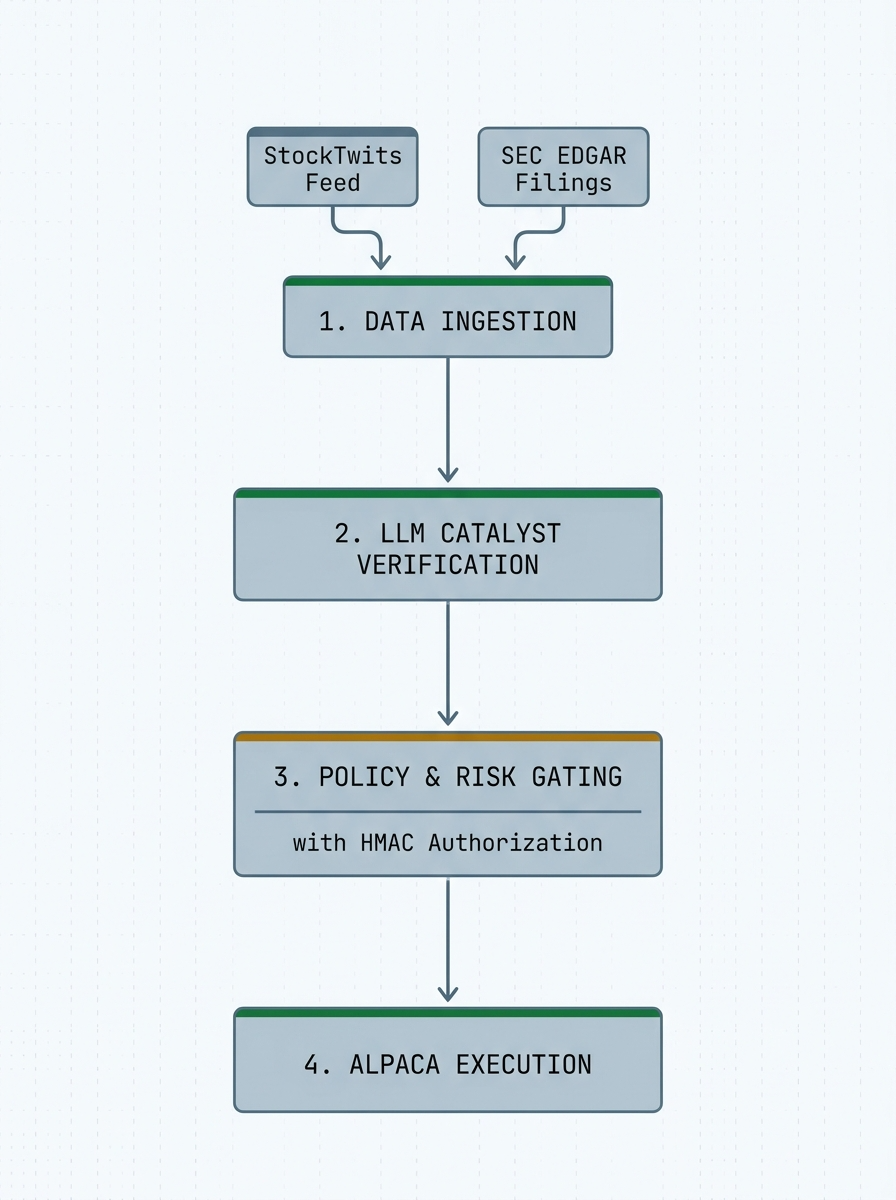
Why this matters: separating research, decisions, and execution can improve observability, auditing, and maintainability.
The Agentic Loop: How NightWatcher Thinks
NightWatcher runs as two interleaved loops. One loop gathers and filters information continuously. The other loop handles position management and execution during the windows where trades are allowed. The system feels simpler once you see those responsibilities as separate.
Loop 1: Signal Research
The first loop scans for symbols with unusual attention, rising message velocity, and a meaningful bullish-to-bearish skew. That gives the system a candidate list, not a buy list. Once a symbol crosses the initial thresholds, the real work begins.
The LLM step is not there to predict the future. Its job is to validate the catalyst. For each candidate, the model asks a more useful question than “is this ticker popular?” It asks whether the move appears tied to something concrete, whether the market is already late to it, and whether there are obvious risks or red flags that should block the trade.
Loop 2: Position and Execution Logic
During market hours, the second loop checks existing positions against hard rules first, then asks whether the thesis still holds. Stop-losses, take-profit thresholds, maximum position counts, and confidence gates are not optional add-ons; they are the framework that keeps the system from drifting into undisciplined behavior.
Only signals that satisfy predefined system thresholds move into the execution path. That means the system trades less often than a pure sentiment bot, but the design is intended to limit trading activity to signals that meet predefined criteria.
Key design decision: the LLM is being used for catalyst validation and decision support, not as a magical oracle. That framing keeps the system grounded and makes prompt iteration much more practical.
Why this matters: not every signal necessarily warrants a trade.
Step-by-Step: Getting NightWatcher Running
You can get from zero to a working paper-trading setup quickly if you treat the system as three pieces: dependencies, credentials, and services. Start in paper mode, watch behavior for a while, and resist the urge to rush into live capital.
Prerequisites
- Node.js 18+ for the trading agent and MCP server.
- An Alpaca account for paper trading and later live execution if you choose to graduate from the system.
- An OpenAI or Claude API key for the catalyst-validation layer.
Step 1. Clone and Install
git clone https://github.com/ygwyg/NIGHTWATCHER-V2.git
cd nightwatcher-V2
npm install

cd dashboard
npm install
cd ..
Step 2. Configure Your Environment
ALPACA_API_KEY=your_alpaca_key
ALPACA_API_SECRET=your_alpaca_secret
ALPACA_PAPER=true
OPENAI_API_KEY=your_openai_key
KILL_SWITCH_SECRET=your_random_secret
Important: keep ALPACA_PAPER=true while you validate the system. The goal of early runs is to observe behavior, not to chase a result.
Step 3. Initialize the Database
bash
npm run db:migrateStep 4. Start the MCP Server
bash
npm run devThe MCP server becomes the policy and execution boundary between your agent and Alpaca.
Step 5. Start the Trading Agent
bash
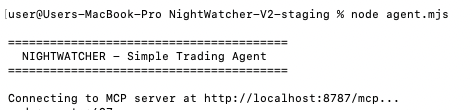
node agent.mjsOnce it boots, you should see the first research cycle begin: signal gathering, analysis, and logging.
Step 6. Start the Dashboard
bash
cd dashboard
npm run dev
Open the local dashboard to monitor active signals, portfolio state, agent activity, and overnight behavior from one place.
Why this matters: a clean setup experience lowers the barrier from “interesting idea” to “working system I can actually inspect.”
Configuration: Tuning NightWatcher’s Behavior
NightWatcher generates an `agent-config.json` file on first run. You can adjust it directly or expose the same controls through the dashboard. These settings are where your risk appetite and your system behavior start to meet.
You can represent the main parameters in a table like this:
Users should test and evaluate any configuration settings in a paper-trading environment before considering live deployment.Lower thresholds only after you understand what kinds of opportunities you are currently rejecting and why.
Why this matters: parameter selection can significantly affect system behavior and risk exposure.
Safety First: Risk Guardrails
One of the things I care most about in NightWatcher V2 is the layered safety model. Automated trading systems should incorporate appropriate controls and risk-management features.
The approval-token flow is the core component of this control framework.. The agent previews an order, the policy layer validates it against available cash and every hard rule, and only then does the system receive a short-lived token that allows submission. No token, no trade.
Why this matters: automated systems may benefit from predefined controls that are applied consistently.
The LLM Catalyst Validator
This is the design choice that separates NightWatcher from a simple sentiment-chasing bot. Most basic systems see a ticker trending and treat attention like evidence. NightWatcher treats attention as a lead, then asks whether the lead is real.
I am not sharing the exact prompt structure or weighting logic because that is a significant part of the system's design. But the conceptual pattern is straightforward: package the context, ask structured questions about catalyst quality and risk, and keep the output constrained enough that it can feed a policy-based system.
Researching New Opportunities
Conceptually, the research loop looks like this:
for each signal in filteredCandidates:
for each signal in filteredCandidates:
  context = {
    symbol,
    sentimentRatio,
    messageVolume,
    recentPriceAction,
    catalystContext,
    obviousRedFlags
  }

  verdict = llm.analyze(context)

  if verdict.action == BUY and verdict.confidence >= config.minAnalystConfidence:
    approvedSignals.push(verdict)
The key is that the model is not being asked to predict a price target. It is being asked to behave more like a fundamental filter: is there a real reason for this move, and is that reason still actionable?
Reviewing Open Positions
A similar pattern is used when reviewing existing holdings:
for each position in currentPortfolio:
  if position.pnlPct >= config.takeProfitPct:
    sell(position, "take profit")

  if position.pnlPct <= -config.stopLossPct:
    sell(position, "stop loss")

  review = llm.analyzePosition(position, currentSentiment)

  if review.action == SELL:
    executeSell(position)
That second pass matters because the right exit is often not visible from price alone. A winning trade can lose its catalyst. A weak thesis can survive on momentum longer than it deserves. The review loop provides an additional analytical input that can be considered alongside other system criteria.
Build-your-own insight: if you are adapting this architecture, most of your iteration time should go into prompt design, output structure, and what evidence is allowed to move a symbol from “interesting” to “tradable.”
Why this matters: filtering criteria can materially affect system behavior and outcomes.
Unified Trading Pipelines: Equities by Day, Crypto by Night
One of the more useful properties of the system is that the operating model can stay the same even when the asset class changes. During market hours, the focus is equities. After the close, the same signal-and-validation loop can monitor crypto pairs such as BTC, ETH, and SOL.
That continuity is valuable because it keeps the dashboard and operating model coherent. When you come back in the morning, you can review what the system saw, what it researched, what it rejected, and whether anything actually made it through the full chain to execution.
Why this matters: reusing one decision framework across multiple markets creates cleaner operations than building disconnected bots for every asset class.
The MCP Server: Available Tools
The MCP server exposes a small, practical set of tools that any client can call. Whether you are extending NightWatcher or building your own agent on top of the same execution pattern, these are the primitives that matter most.
Why this matters: clean execution primitives let you evolve the strategy logic without constantly rewriting the broker-facing layer.
Build Your Own: Wiring Up Alpaca as the Execution Layer
Even if you do not use NightWatcher itself, the patterns below can take you from “I have a signal” to “I have a position on Alpaca.” This is the execution plumbing. Users may choose to incorporate their own data sources, research processes, or trading logic.
Initialize the Alpaca Client (Node.js)
import fetch from "node-fetch";

const ALPACA_BASE =
  process.env.ALPACA_PAPER === "true"
    ? "https://paper-api.alpaca.markets"
    : "https://api.alpaca.markets";

const ALPACA_DATA = "https://data.alpaca.markets";

const headers = {
  "APCA-API-KEY-ID": process.env.ALPACA_API_KEY,
  "APCA-API-SECRET-KEY": process.env.ALPACA_API_SECRET,
  "Content-Type": "application/json",
};

async function getAccount() {
  const res = await fetch(`${ALPACA_BASE}/v2/account`, { headers });
  return res.json();
}

async function isMarketOpen() {
  const res = await fetch(`${ALPACA_BASE}/v2/clock`, { headers });
  const clock = await res.json();
  return clock.is_open;
}
Submit Orders
async function submitOrder(symbol, qty, side = "buy") {
  const res = await fetch(`${ALPACA_BASE}/v2/orders`, {
    method: "POST",
    headers,
    body: JSON.stringify({
      symbol,
      qty: String(qty),
      side,
      type: "market",
      time_in_force: "day",
    }),
  });

  if (!res.ok) {
    const err = await res.json();
    throw new Error(`Order failed: ${err.message}`);
  }

  return res.json();
}
Manage Positions
async function getPositions() {
  const res = await fetch(`${ALPACA_BASE}/v2/positions`, { headers });
  return res.json();
}

async function closePosition(symbol) {
  const res = await fetch(`${ALPACA_BASE}/v2/positions/${symbol}`, {
    method: "DELETE",
    headers,
  });
  return res.json();
}
Get Real-Time Quotes
async function getQuote(symbol) {
  const res = await fetch(
    `${ALPACA_DATA}/v2/stocks/${symbol}/snapshot`,
    { headers }
  );
  return res.json();
}
Minimal Agent Loop
async function runAgent() {
  while (true) {
    try {
      const open = await isMarketOpen();
      if (!open) {
        await sleep(60000);
        continue;
      }

      const account = await getAccount();
      const buyingPower = parseFloat(account.buying_power);
      const positions = await getPositions();

      for (const pos of positions) {
        const pnlPct =
          ((pos.current_price - pos.avg_entry_price) /
            pos.avg_entry_price) *
          100;

        if (pnlPct >= 8) await closePosition(pos.symbol);
        if (pnlPct <= -4) await closePosition(pos.symbol);
      }

      const signals = await yourSignalLogic();

      for (const sig of signals) {
        if (positions.length >= 3) break;
        if (buyingPower < 2000) break;
        await submitOrder(sig.symbol, sig.qty, "buy");
      }
    } catch (err) {
      console.error("Agent error:", err.message);
    }

    await sleep(60000);
  }
}
The execution layer should feel boring. That is a compliment. The strategy should be where things get interesting; the broker plumbing should be stable, explicit, and easy to reason about.
Why this matters: when your execution foundation is clean, you can spend your energy improving signal quality instead of fighting infrastructure.
What NightWatcher Does Not Do
It is just as important to be explicit about what NightWatcher is not.
- It does not predict markets with certainty.
- It does not remove drawdowns or trading risk.
- It does not replace paper testing, monitoring, or judgment.
- It does not turn noisy sentiment into edge unless the filtering logic is genuinely good.
- It does not excuse weak risk controls just because an LLM is involved.
That section matters because too much trading content skips the boundaries and over-indexes on possibility. NightWatcher is best understood as a structured framework for testing ideas, enforcing policy, and making systematic execution more legible.
Why this matters: data quality and system design can significantly affect system behavior and outcomes.
Extending the System
If you fork NightWatcher or build your own version, the highest-leverage improvements are not cosmetic. They are often about evidence quality and risk discipline.
- Add more data sources such as news APIs, SEC filings, or earnings calendars.
- Require multi-source confirmation before a symbol even reaches the LLM stage.
- Strengthen the policy engine with better portfolio-wide controls and loss throttles.
- Improve prompts by adding market structure, price context, or sector-specific risk factors.
- Expand asset support only after the operating model is already stable.
Why this matters: the biggest gains in execution usually come from improving evidence quality, not from adding more complexity for its own sake.
Estimated Cost
You can summarize the cost profile like this:
In practice, the system can be inexpensive to run while you are experimenting in paper mode. The real cost is not just API spend. It is the time required to refine prompts, thresholds, and risk controls until the machine behaves in a way you actually trust.
Troubleshooting
- Failed to connect to the MCP server: make sure the server is running before the agent starts.
- Invalid API key: check your .dev.vars file for typos, line breaks, or stale credentials.
- No trades are firing: inspect your confidence thresholds, your minimum signal quality settings, and what the LLM is rejecting.
- OpenAI costs are rising: widen the polling interval, reduce unnecessary research calls, and monitor how often the agent is analyzing low-quality candidates.
What’s Next
NightWatcher V2 is open source because I want to make serious trading-system design feel more accessible to independent builders. Many different types of developers and market participants can experiment with building systematic trading workflows.You need curiosity, a clear architecture, a solid execution layer, and enough patience to iterate honestly.
If you take one thing from this project, let it be this: the objective is not automation by itself. It is often about building a system that applies predefined processes consistently.
Resources
If you want to start building your own systematic trading system, here are the resources I found most useful:
Sign up for Alpaca’s Trading API account to get started with programmatic trading, including access to market data, order execution, and paper trading.
How to Connect to Alpaca’s Trading API provides a step-by-step guide to setting up authentication and making your first API requests.
How to Start Paper Trading with Alpaca's Trading API provides you a step-by-step guide to start using a paper account. Same API, same execution, no risk.
NightWatcher V2 on GitHub (NightWatwatcher-V2 Git) is an open-source trading system that demonstrates how to structure and deploy automated strategies in a real-world environment.
About the Author
Chiranjeev Shah
He is a systems architect and builder driven by first-principles engineering and a commitment to local computation and absolute privacy. He believe's software should operate where it belongs—on-device and under self-sovereign control—free from the risks of fragile third-party integrations. His technical stack is selected for speed, performance, and security: Swift, SwiftUI, TypeScript, Cloudflare Workers, Python, PyTorch, LangGraph, Next.js, and local LLMs. His work focuses on developing autonomous trading systems, local OS architectures, and infrastructure for sovereign finance and media deployment.
*The Paper Trading API is offered by AlpacaDB, Inc. and does not require real money or permit a user to transact in real securities in the market. Providing use of the Paper Trading API is not an offer or solicitation to buy or sell securities, securities derivative or futures products of any kind, or any type of trading or investment advice, recommendation or strategy, given or in any manner endorsed by AlpacaDB, Inc. or any AlpacaDB, Inc. affiliate and the information made available through the Paper Trading API is not an offer or solicitation of any kind in any jurisdiction where AlpacaDB, Inc. or any AlpacaDB, Inc. affiliate (collectively, “Alpaca”) is not authorized to do business.
NightWatcher is an experimental software project developed by a third-party user and is not a product, service, or recommendation of Alpaca. Automated trading systems involve significant risks, including model errors, inaccurate or incomplete data, technology failures, cybersecurity incidents, unexpected market conditions, and substantial losses. The use of automation does not guarantee investment success, improved performance, or reduced risk.
This article is for educational and informational purposes only and should not be construed as investment advice, a recommendation, or an offer to buy or sell any security or cryptocurrency. The views expressed are those of the author and do not necessarily reflect those of Alpaca. Alpaca does not recommend any specific securities, cryptocurrencies, or investment strategies. Examples provided are illustrative only and are not indicative of future results.
Alpaca does not prepare, edit, endorse, or guarantee the accuracy of third-party content and is not responsible for content available through third-party sources.
All investments involve risk, including the possible loss of principal. Past performance, hypothetical results, and backtested results do not guarantee future returns.
Cryptocurrency is highly speculative and involves substantial risk, including extreme volatility and the potential loss of value
Securities brokerage services are provided by Alpaca Securities LLC ("Alpaca Securities"), member FINRA/SIPC, a wholly-owned subsidiary of AlpacaDB, Inc. Technology and services are offered by AlpacaDB, Inc.
Cryptocurrency services are made available by Alpaca Crypto LLC ("Alpaca Crypto"), a FinCEN registered money services business (NMLS # 2160858), and a wholly-owned subsidiary of AlpacaDB, Inc. Alpaca Crypto is not a member of SIPC or FINRA. Cryptocurrencies are not stocks and your cryptocurrency investments are not protected by either FDIC or SIPC. Please see the Disclosure Library for more information.
This is not an offer, solicitation of an offer, or advice to buy or sell securities or cryptocurrencies or open a brokerage account or cryptocurrency account in any jurisdiction where Alpaca Securities or Alpaca Crypto, respectively, are not registered or licensed, as applicable.