Alpaca now offers 24/5 trading for US equities to Trading API users. This means developers, professional traders, and funds with direct, programmatic access to Alpaca’s brokerage infrastructure can trade stocks from 8:00 PM ET Sunday to 8:00 PM ET Friday, including after-hours and overnight sessions when major market news sometimes breaks.
This guide shows you how to get started with 24/5 trading using Alpaca’s Trading API, as well as Alpaca’s web dashboard.
To get the most out of this guide, explore the following resources first:
How Does This Launch Impact my Current Trade Set Up with Alpaca’s SDKs?
Alpaca’s 24/5 trading requires no SDK changes; just a few minor parameter changes. You can mostly use your existing workflow to trade all National Market System (NMS) securities before market open, after the standard close, and overnight through the week.
How to Place Your First 24/5 Trade with Alpaca
Executing 24/5 trading with the Alpaca’s Trading API works similarly to regular market hour trading. Let’s walk through a basic example of how to trade US equities using Alpaca’s Trading API.
Prerequisites
To be able to place your first trade, you’ll need:
- Alpaca's Trading API account
- You can receive your
ALPACA_API_KEYandALPACA_SECRET_KEYfrom your Alpaca dashboard - Check out our tutorial article: How to Start Paper Trading with Alpaca's Trading API
- You can receive your
- Google Colab or Code Editor (IDE)
- Python
- Python package manager (e.g pip or uv)
Step 1: Install the Alpaca’s SDK
We install the alpaca-py package to use the Alpaca’s Trading API.
!uv pip install alpaca-pyStep 2: Connect to the API
We import and initialize the clients for trading. We use a paper environment for this example so set the paper variable as True.
from alpaca.trading.client import TradingClient
from alpaca.data.historical.stock import StockHistoricalDataClient
from alpaca.trading.requests import MarketOrderRequest, ClosePositionRequest
from alpaca.trading.enums import OrderSide, TimeInForce
from alpaca.data.requests import StockLatestQuoteRequest
from alpaca.data.enums import DataFeed
ALPACA_API_KEY = "YOUR_ALPCA_API_KEY"
ALPACA_API_SECRET = "YOUR_ALPACA_SECRET_KEY"
ALPACA_PAPER_TRADE = True
trade_client = TradingClient(api_key=ALPACA_API_KEY, secret_key=ALPACA_API_SECRET, paper=ALPACA_PAPER_TRADE)
stock_historical_data_client = StockHistoricalDataClient(api_key=ALPACA_API_KEY, secret_key=ALPACA_API_SECRET)
Step 3: Check the Market Data
To access overnight market data, use feed=boats if you are subscribed to the Algo Trader Plus plan, or feed=overnight if you are on the Basic plan, when calling the Latest Quotes, Bars, or Trades endpoints. This data is available between 8:00 PM and 4:00 AM ET. See the 24/5 FAQ in the API documentation for more details.
# Create the request object with overnight feed parameter
request_params = StockLatestQuoteRequest(
    symbol_or_symbols=[symbol],
    feed=DataFeed.OVERNIGHT,
)
# Submit a request for the latest stock quote data
quotes = stock_historical_data_client.get_stock_latest_quote(request_params)
quotes
Step 4: Determine What Stock You Want to Trade
You can identify assets eligible for overnight trading by checking the overnight_tradable attribute in the Assets API for each symbol. See the API documentation for “Get Assets” for details.
For example, the following code would display the output below.
symbol = "SPY"
trade_client.get_asset(symbol)
{
"id": "c8024b9e-d4cf-4afe-a8d9-2fa2d7ed73ac",
"class": "us_equity",
"exchange": "NYSE",
"symbol": "SPY",
"name": "State Street SPDR S&P 500 ETF Trust",
"status": <AssetStatus.ACTIVE: 'active'>,
"tradable": true,
"marginable": true,
"maintenance_margin_requirement": 100,
"margin_requirement_long": "100",
"margin_requirement_short": "100",
"shortable": true,
"easy_to_borrow": true,
"fractionable": true,
"attributes": [
"fractional_eh_enabled",
"has_options",
"overnight_tradable"
]
}Step 5: Submit a 24/5 Market Order
Use the same /orders endpoint as regular trading. Set time_in_force="day" and submit a LIMIT order with the limit price derived from the latest quote data. In this example, the limit price is set at 95 percent of the current ask price for SPY.
Note:
- Only “LIMIT” orders with Time-in-Force (TIF) of “DAY” and “GTC” are currently supported. All other order types will be rejected.
- “DAY” orders placed during the overnight session will remain active through the regular and after-hours sessions of the upcoming trading day. If unfilled, the order is canceled at 8:00 PM ET.
- “GTC” (Good-Til-Canceled) orders will expire 90 days after the order is placed. In the case of corporate actions events, the `gtc` order will be cancelled prior to the corporate action event.
- Set
extended_hoursto “True” to trade during extended hours. - The overnight session is treated as the first session of the trade day. Unfilled overnight orders transition to the pre-market session and remain active through regular trading hours for that trade day.
symbol = "SPY"
# ref. https://docs.alpaca.markets/docs/working-with-orders
order = LimitOrderRequest(
    symbol=symbol,
    qty=1,
    OrderType.LIMIT,
    limit_price=quotes[symbol].ask_price * 0.95
    side=OrderSide.BUY,
    time_in_force=TimeInForce.DAY,
    extended_hours=True
)

# ref. https://docs.alpaca.markets/docs/orders-at-alpaca
trade_client.submit_order(order)
print("Order submitted for 24/5 execution.")
Step 6: Check Order Status and Position
This allows you to verify fills during extended hours and execute follow-up logic if needed.
# Check order by symbol
# ref. https://docs.alpaca.markets/reference/getallorders-1
open_orders = GetOrdersRequest(
    # Extract only opened orders
    status=QueryOrderStatus.OPEN,
    direction=None,
    side=None,
    symbols=None
)
orders = trade_client.get_orders(open_orders)
for o in orders:
    print(o.id, o.status)

# get positions by symbol
# ref. https://docs.alpaca.markets/reference/getopenposition-1
position = trade_client.get_open_position(symbol_or_asset_id=symbol)
position
Step 7: Close Order (Optional)
If you have an active open position and want to exit during an extended session, you can submit a closing order using the close_position function.
# close the position with specifying qty
# ref. https://docs.alpaca.markets/reference/deleteopenposition-1
trade_client.close_position(
    symbol_or_asset_id=symbol,
    close_options=ClosePositionRequest(qty=1)
)
24/5 Trading on Alpaca's Dashboard
If you prefer to place orders without writing code, you can also trade during after-hours and overnight sessions directly from the Alpaca Dashboard.
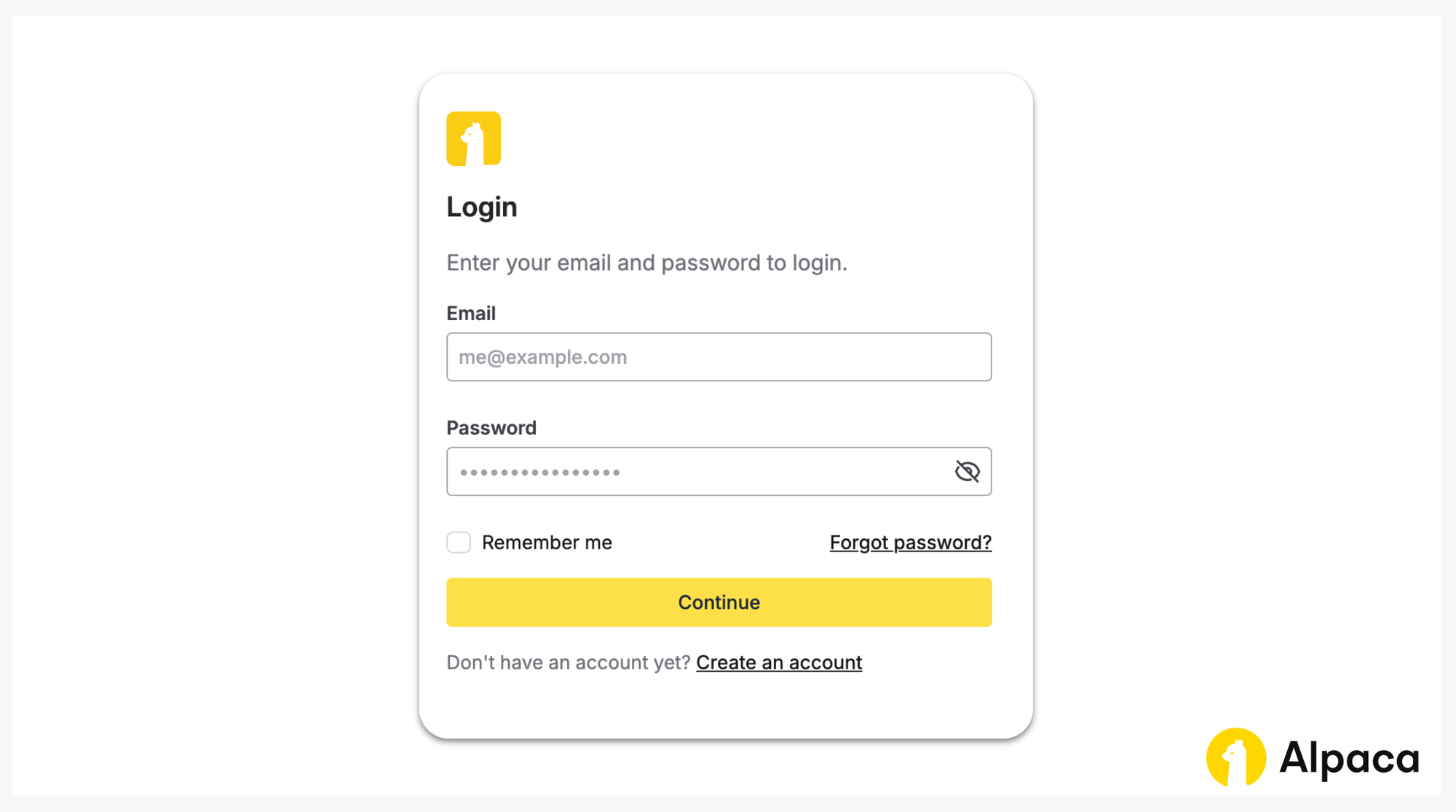
Step 1: Log in to your Alpaca account
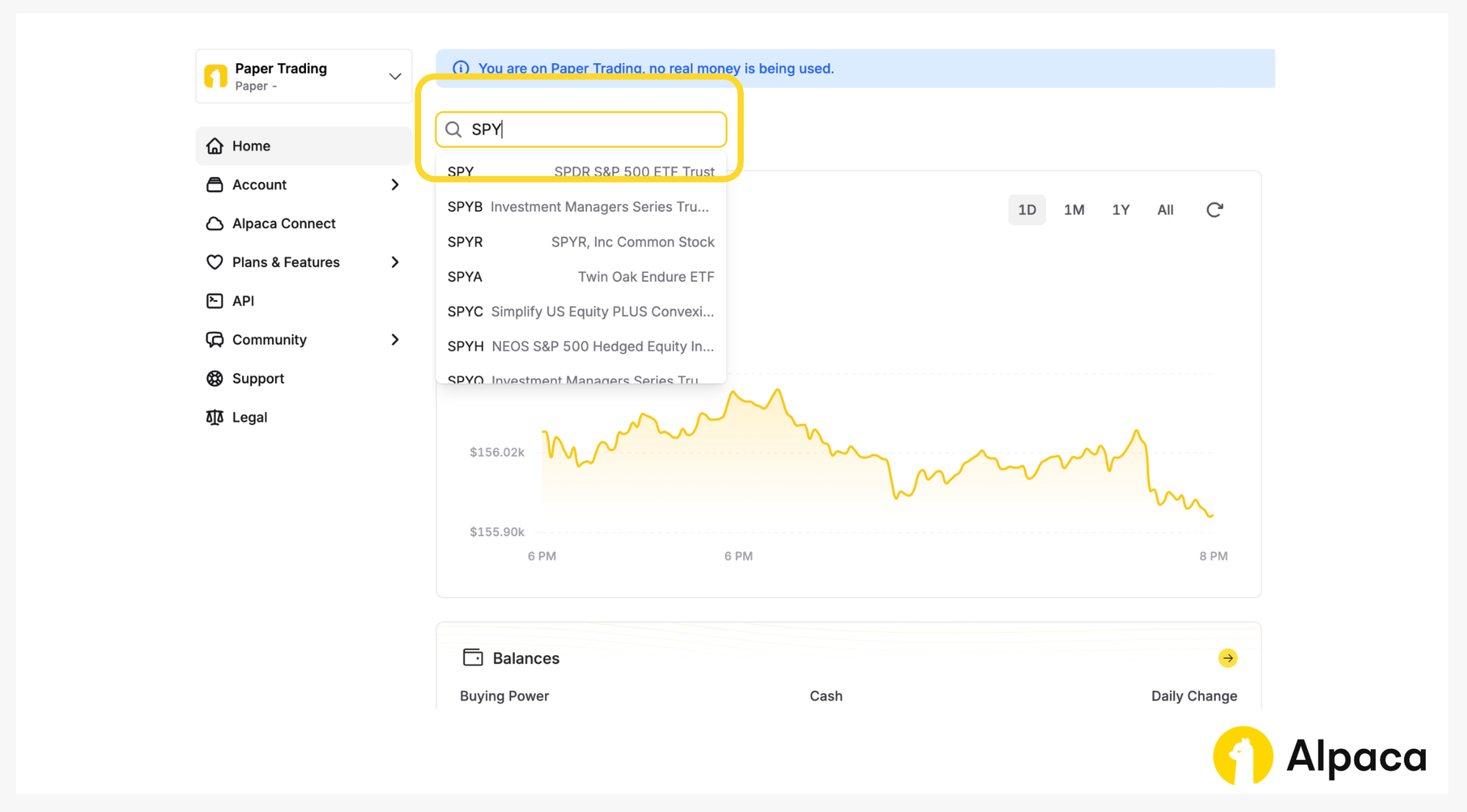
Step 2: Search for the stock you want to trade
Step 3: Define Order Type and Time-in-Force (TIF)
Make sure the Order Type and Time in Force setting supports 24/5 trading:
- Only
dayandgtcorders are valid for overnight trading - Only
limitorders are supported for overnight trading
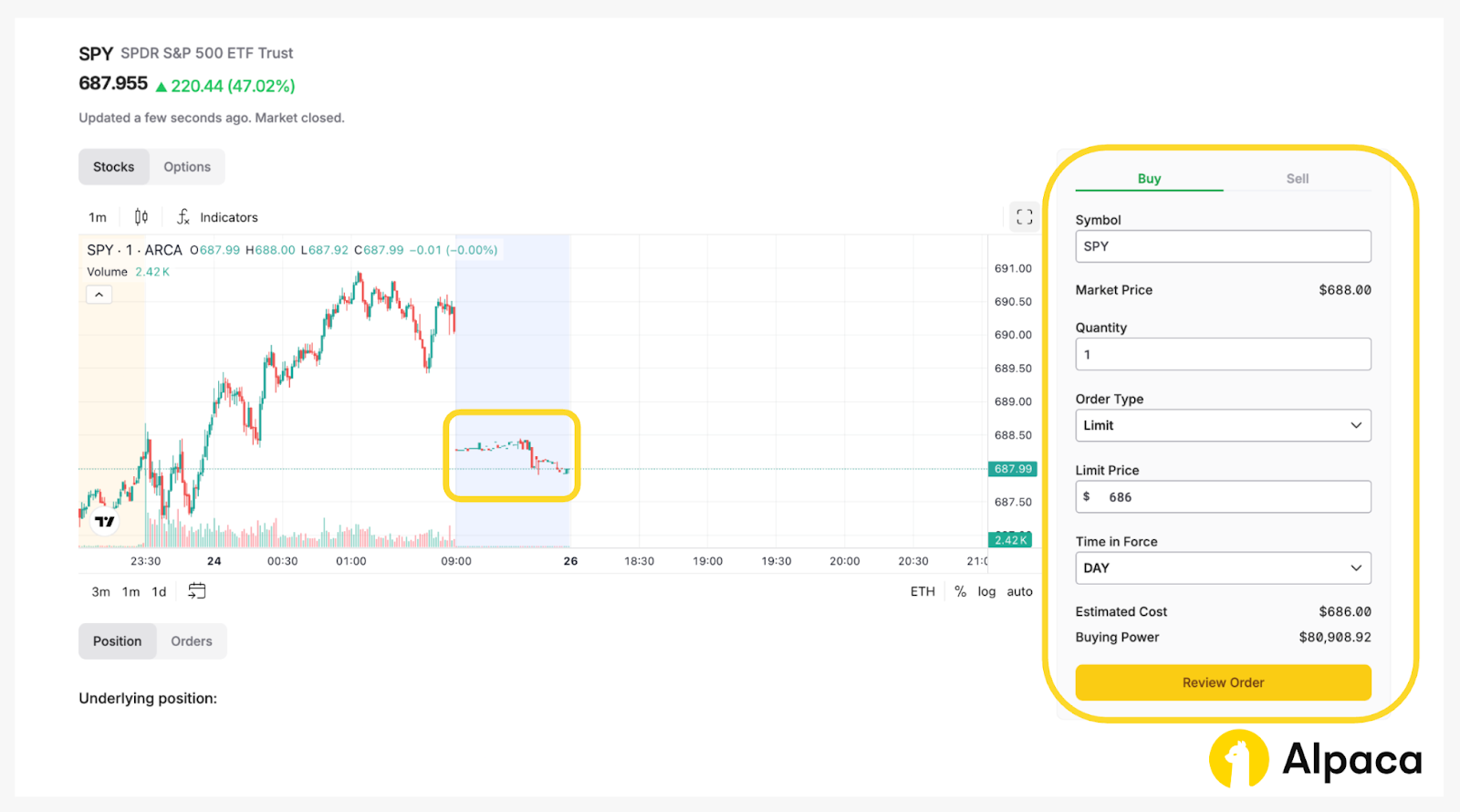
Step 4: Review your order details and submit
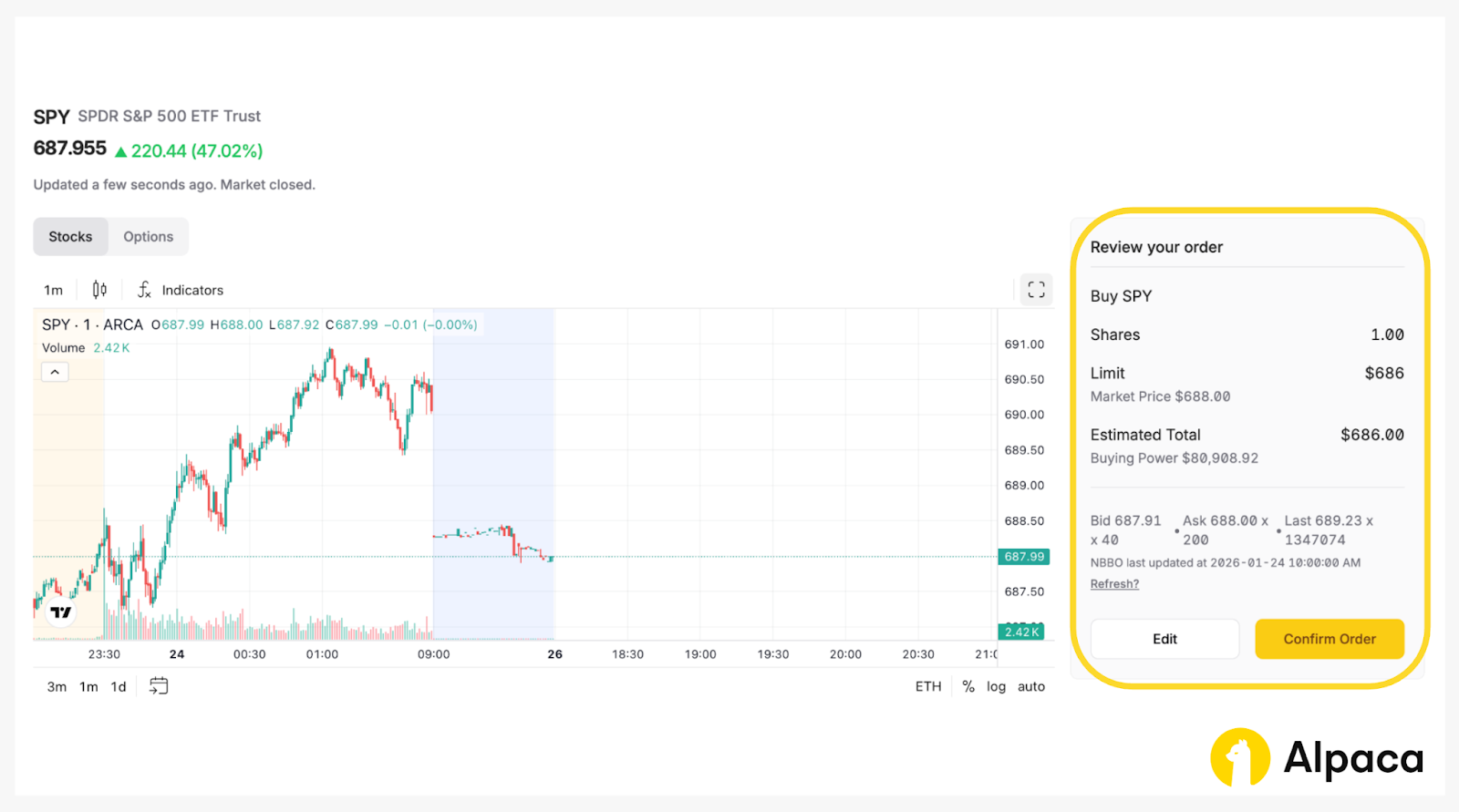
Once you review your order details, click the “Confirm Order” button.
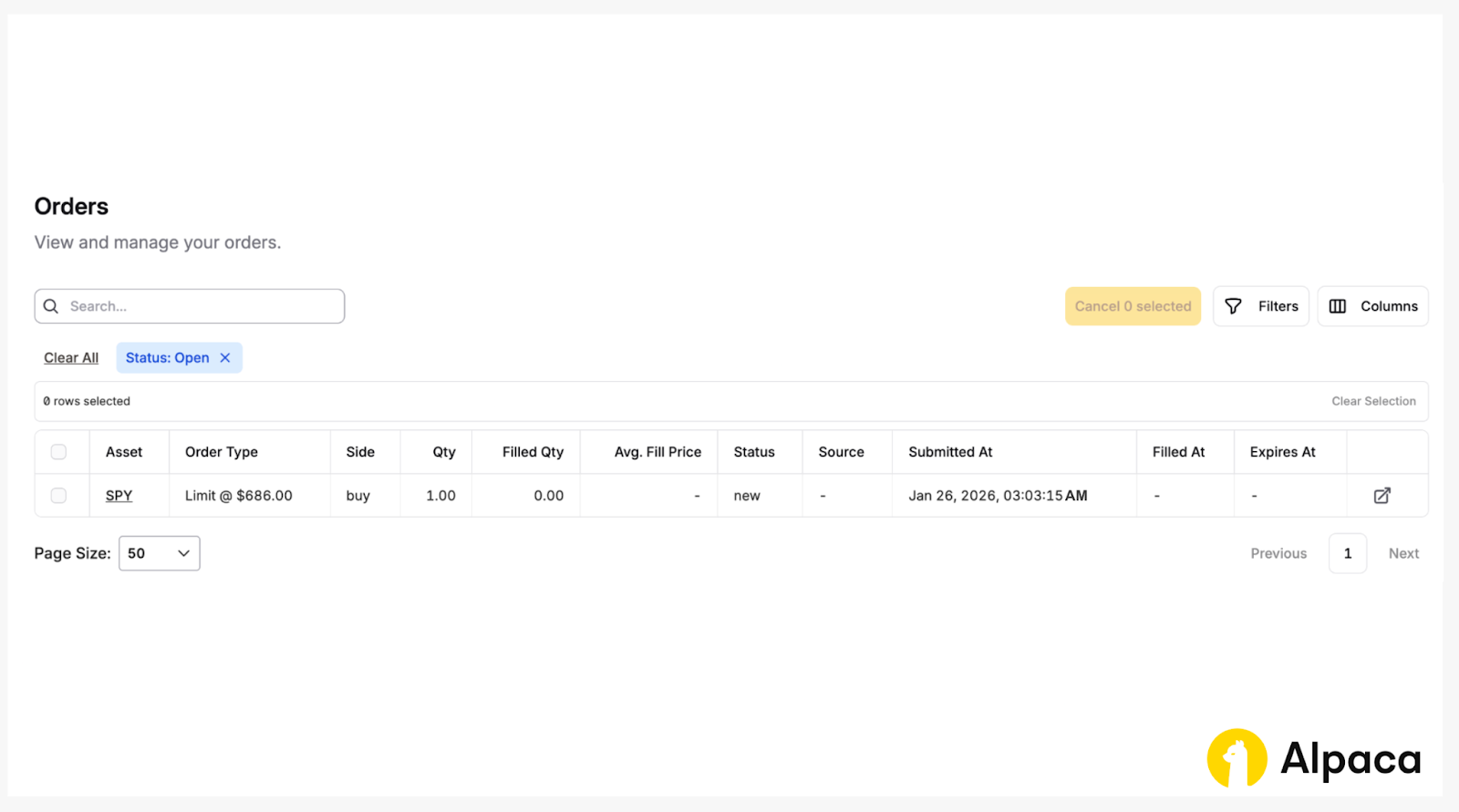
You can monitor fills and open positions in real time on the Portfolio and Activity pages.
No extra configuration required. Dashboard orders will follow the same routing and extended-hours rules applied to API orders.
Conclusion
With 24/5 support, algo traders can now:
- React instantly to pre and after-market news
- Expand strategy coverage
- Trade on 24/5 signal triggers
No extra setup required. You can just use your existing API workflow. If needed, you can also switch back to regular extended hours trading.
If you’d like to learn more about trading algorithmically with Alpaca’s Trading API, explore the resources below:

Frequently Asked Questions
What is 24/5 trading?
US 24/5 trading allows you to place and execute US equity orders nearly around the clock from Sunday evening through Friday evening, including overnight, pre market, regular market, and after hours sessions.
What hours is 24/5 trading available?
Trading sessions for US equities on Alpaca's Trading API are structured as follows:
- Overnight session: 8:00 PM to 4:00 AM ET
- Pre market session: 4:00 AM to 9:30 AM ET
- Regular market session: 9:30 AM to 4:00 PM ET
- After hours session: 4:00 PM to 8:00 PM ET
The overnight session follows the NYSE holiday calendar. Overnight trading does not run on evenings before market holidays but runs for a full 8 hours on market half days.
How do I determine what stocks are available in 24/5 trading?
All National Market System securities are eligible for overnight trading. OTC securities and options are not available. Eligible assets can be identified using the overnight_tradable attribute in the Assets API. See the API documentation for Get Assets.
What order types and time in force options are supported in 24/5 trading?
Overnight trading supports limit orders only. Available TIF (time-in-force) are DAY and GTC.
Are stocks always available during the 24/5 overnight session?
No. While many National Market System equities are eligible for overnight trading, availability is not guaranteed in every session. A stock may be temporarily unavailable if it is undergoing corporate action processing such as stock splits, dividends, mergers, or similar events, or if broker, venue, or market level risk controls apply. Eligibility for overnight trading can change at any time. You can check whether an asset is currently eligible using the overnight_tradable attribute in the Assets API.
What order types and time in force options are supported in 24/5 trading?
Overnight trading supports limit orders only. Available TIF (time-in-force) are DAY and GTC.
How does margin work in 24/5 trading?
Margin buying power during 24/5 trading follows extended hours rules, with up to 2 times buying power available overnight. Day trading buying power does not apply during the overnight session, and orders relying on it may be rejected at 8:00 PM ET if sufficient non day trading buying power is not available.
Is fractional share trading supported in 24/5 trading with Alpaca's Trading API?
Yes, fractional share trading is supported during the overnight session and functions the same way as it does during other extended hours sessions.
What are the risks of 24/5 trading?
Liquidity can be lower and spreads wider outside regular market hours, which may increase execution costs and price volatility. Review order types, liquidity conditions, and routing behavior before placing overnight orders.
1.“24x5 trading Market opportunities and trends”, KPMG, 2025
*Please note that we are using SPY as an example, and it should not be considered investment advice.
Please note that this article is for general informational purposes only and is believed to be accurate as of the posting date but may be subject to change. The examples above are for illustrative purposes only.
All investments involve risk, and the past performance of a security, or financial product does not guarantee future results or returns. There is no guarantee that any investment strategy will achieve its objectives. Please note that diversification does not ensure a profit, or protect against loss. There is always the potential of losing money when you invest in securities, or other financial products. Investors should consider their investment objectives and risks carefully before investing.
The Paper Trading API is offered by AlpacaDB, Inc. and does not require real money or permit a user to transact in real securities in the market. Providing use of the Paper Trading API is not an offer or solicitation to buy or sell securities, securities derivative or futures products of any kind, or any type of trading or investment advice, recommendation or strategy, given or in any manner endorsed by AlpacaDB, Inc. or any AlpacaDB, Inc. affiliate and the information made available through the Paper Trading API is not an offer or solicitation of any kind in any jurisdiction where AlpacaDB, Inc. or any AlpacaDB, Inc. affiliate (collectively, “Alpaca”) is not authorized to do business.
Fractional share trading allows a customer to buy and sell fractional share quantities and dollar amounts of certain securities. Fractional share trading presents unique risks and is subject to particular limitations that you should be aware of before engaging in such activity. See Alpaca Customer Agreement at https://alpaca.markets/disclosures for more details.
Margin trading involves significant risk and is not suitable for all investors. Before considering a margin loan, it is crucial that you carefully consider how borrowing fits with your investment objectives and risk tolerance.
When trading on margin, you assume higher market risk, and potential losses can exceed the collateral value in your account. Alpaca may sell any securities in your account, without prior notice, to satisfy a margin call. Alpaca may also change its “house” maintenance margin requirements at any time without advance written notice. You are not entitled to an extension of time on a margin call. Please review the Firm’s Margin Disclosure Statement before investing.
Options trading is not suitable for all investors due to its inherent high risk, which can potentially result in significant losses. Please read Characteristics and Risks of Standardized Options before investing in options.
Securities brokerage services are provided by Alpaca Securities LLC (dba "Alpaca Clearing"), member FINRA/SIPC, a wholly-owned subsidiary of AlpacaDB, Inc. Technology and services are offered by AlpacaDB, Inc.
This is not an offer, solicitation of an offer, or advice to buy or sell securities or open a brokerage account in any jurisdiction where Alpaca Securities is not registered or licensed, as applicable.