Overview: The Scope of Impact of Trading API Credentials
In algorithmic trading, your API key pair is a core credential controlling programmatic access to your account. Understanding how API keys operate requires establishing their exact capabilities and scope of impact:
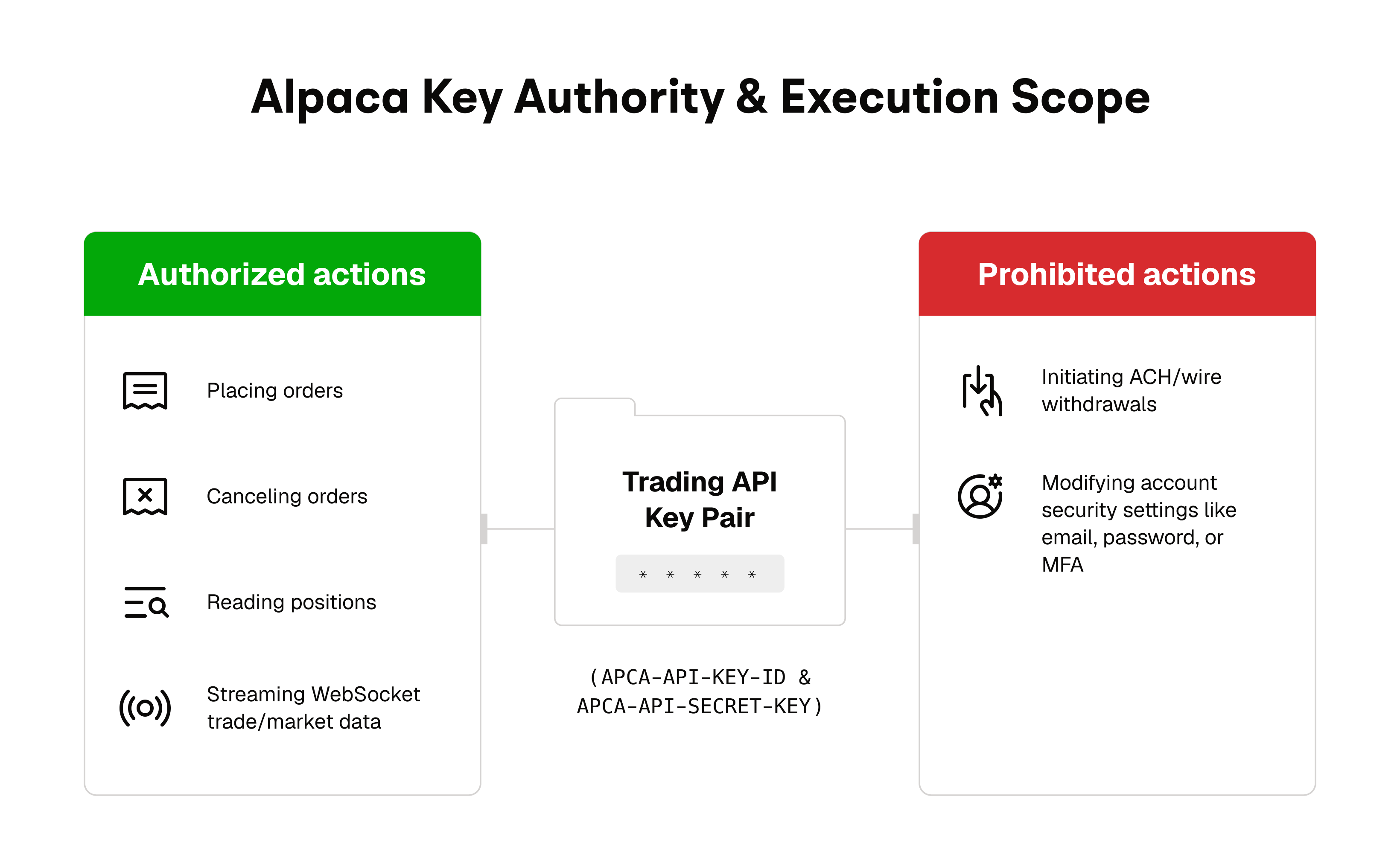
- What a Leaked Trading API Key Can Do: An unauthorized party with your API key pair can submit orders, cancel open orders, liquidate positions, and query portfolio telemetry within the limits of your account's available cash and buying power.
- What a Trading API Key Cannot Do: Direct Trading API keys cannot initiate ACH bank deposits or request wire withdrawals. However, whitelisting operations (e.g.,
POST /v2/wallets/whitelists) are still within the key's scope of impact and must be treated as sensitive. General bank funding remains segregated within the Alpaca Web Dashboard requiring MFA.
Because algorithmic orders execute in milliseconds, compromised credentials can cause rapid financial losses through unwanted market exposure. Securing API keys across local development, CI/CD pipelines, and cloud environments is an important safeguard for automated trading systems.
What an Alpaca API Key Actually Is
When you generate credentials in the Alpaca Dashboard, you receive a key ID and secret pair:
- API Key (
APCA-API-KEY-ID/ALPACA_API_KEY): The public identifier for your trading account. It tells the Alpaca API gateway which account is making the request. - API Secret Key (
APCA-API-SECRET-KEY/ALPACA_SECRET_KEY): The private cryptographic secret used to authenticate your request.
Safeguard both values and do not publish or share either part of the credential pair.
Host Binding: Paper vs. Live
Paper and live trading use separate API domains and separate credentials:
- Paper Trading Host:
https://paper-api.alpaca.markets - Live Trading Host:
https://api.alpaca.markets
While Paper keys often begin with a PK... prefix and Live keys with an AK... prefix, these prefixes are visual hints. The authoritative security boundary is the host environment itself: a paper key pair will be rejected with an HTTP 401 Unauthorized error if sent to the live brokerage endpoint.
Step-by-Step: Creating a Paper Key with Safety Defaults
Always generate and test API keys in a paper trading environment before deploying live capital.
Step 1: Switch to Paper Trading
- Log in to the Alpaca Dashboard.
- In the top navigation bar, ensure the account environment is toggled to Paper Trading.
Step 2: Generate Credentials
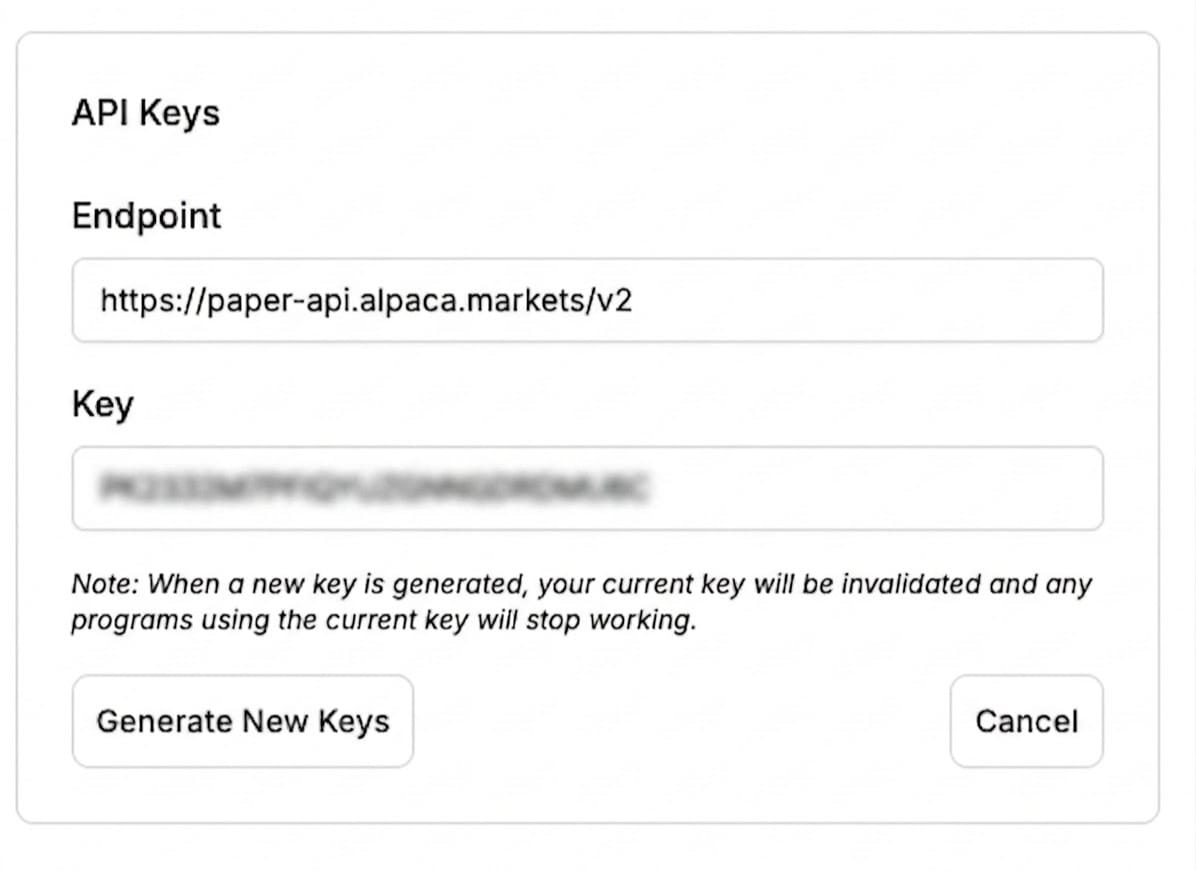
- Navigate to the API Keys module on the right side of the dashboard.
- Click Generate New Key.
- A modal will display your API Key and Secret Key.
Step 3: Secure Your Secret Immediately
- CRITICAL: The Secret Key is displayed only once upon generation. If you close the modal without copying it, the key cannot be retrieved; you will need to regenerate a new pair.
- Copy the secret key directly into an encrypted password manager or local .env configuration.
- Security Rule: Never email your secret key, store it in unencrypted cloud documents, or share it across messaging platforms (Slack, Discord, Teams, SMS).
Core Principles of API Key Hygiene
Principle 1: Never Hardcode Credentials in Source Code
Embedding API keys as literal strings inside Python scripts, Jupyter notebooks, or configuration files is a common leak path.
# FORBIDDEN: Never hardcode credentials in source code
API_KEY = "PKXXXXXXXXXXXXXXXXXX"        # VULNERABLE TO COMMIT LEAKS
SECRET_KEY = "YYYYYYYYYYYYYYYYYYYYYYYY"  # CRITICAL SECURITY RISK
Principle 2: Use Environment Variables & Local Plaintext Isolation
Store keys in a local .env file that is strictly excluded from version control via .gitignore.
# .env file (stored locally on developer machine, never committed)
ALPACA_API_KEY="PKXXXXXXXXXXXXXXXXXX"
ALPACA_SECRET_KEY="YYYYYYYYYYYYYYYYYYYYYYYYYYYYYYYYYYYYYYYY"
ALPACA_PAPER=true
# .gitignore file (ensures local configuration files are never pushed to Git)
.env
.env.*
*.pem
*.key
credentials.jsonPrinciple 3: Production Code Implementation (Python & alpaca-py)
In production applications using the official alpaca-py SDK, read environment variables from the operating system process and pass them explicitly into the TradingClient constructor
""""
Production-Grade API Key Loading Pattern for Alpaca Trading SDK
Targeting: Python 3.10+, alpaca-py
"""
import os
from dotenv import load_dotenv
from alpaca.trading.client import TradingClient
# Load environment variables from local .env file (development only)
load_dotenv()
def get_alpaca_trading_client() -> TradingClient:
    api_key = os.environ.get("ALPACA_API_KEY")
    secret_key = os.environ.get("ALPACA_SECRET_KEY")
    paper_raw = os.environ.get("ALPACA_PAPER", "").lower()
    # Robust validation: Reject unknown or missing environment values
    if not api_key or not secret_key:
        raise ValueError("Missing required ALPACA_API_KEY or ALPACA_SECRET_KEY.")
    if paper_raw in ("true", "1", "yes"):
        is_paper = True
    elif paper_raw in ("false", "0", "no"):
        is_paper = False
    else:
        raise ValueError(f"Ambiguous ALPACA_PAPER value: '{paper_raw}'. Expected 'true' or 'false'.")
    return TradingClient(api_key=api_key, secret_key=secret_key, paper=is_paper)
if __name__ == "__main__":
    client = get_alpaca_trading_client()
    print(f"Connected to {'Paper' if client.paper else 'Live'} successfully.")
Principle 4: Understand CLI and MCP Environment Variable Polarity
Different developer tools evaluate environment flags with specific naming conventions:
- Alpaca MCP Server: Evaluates
ALPACA_PAPER_TRADE(acceptstrue,1,yesas paper mode; any other value defaults to live mode). - Alpaca CLI: Evaluates
ALPACA_LIVE_TRADE; onlytrueselects live mode. To ensure safety, it is recommended to explicitly validate this flag and reject unknown values to prevent accidental live execution from malformed environment strings. - Alpaca Python SDK (
alpaca-py): Defaults topaper=True(Paper Trading). It is recommended to explicitly passpaper=Trueorpaper=Falseto ensure your configuration is intentional and unambiguous.
Incident Response: Key Revocation & History Purging
If you suspect an API key has been committed to a Git repository, shared accidentally, or exposed in server logs, execute this four-step incident response plan immediately:
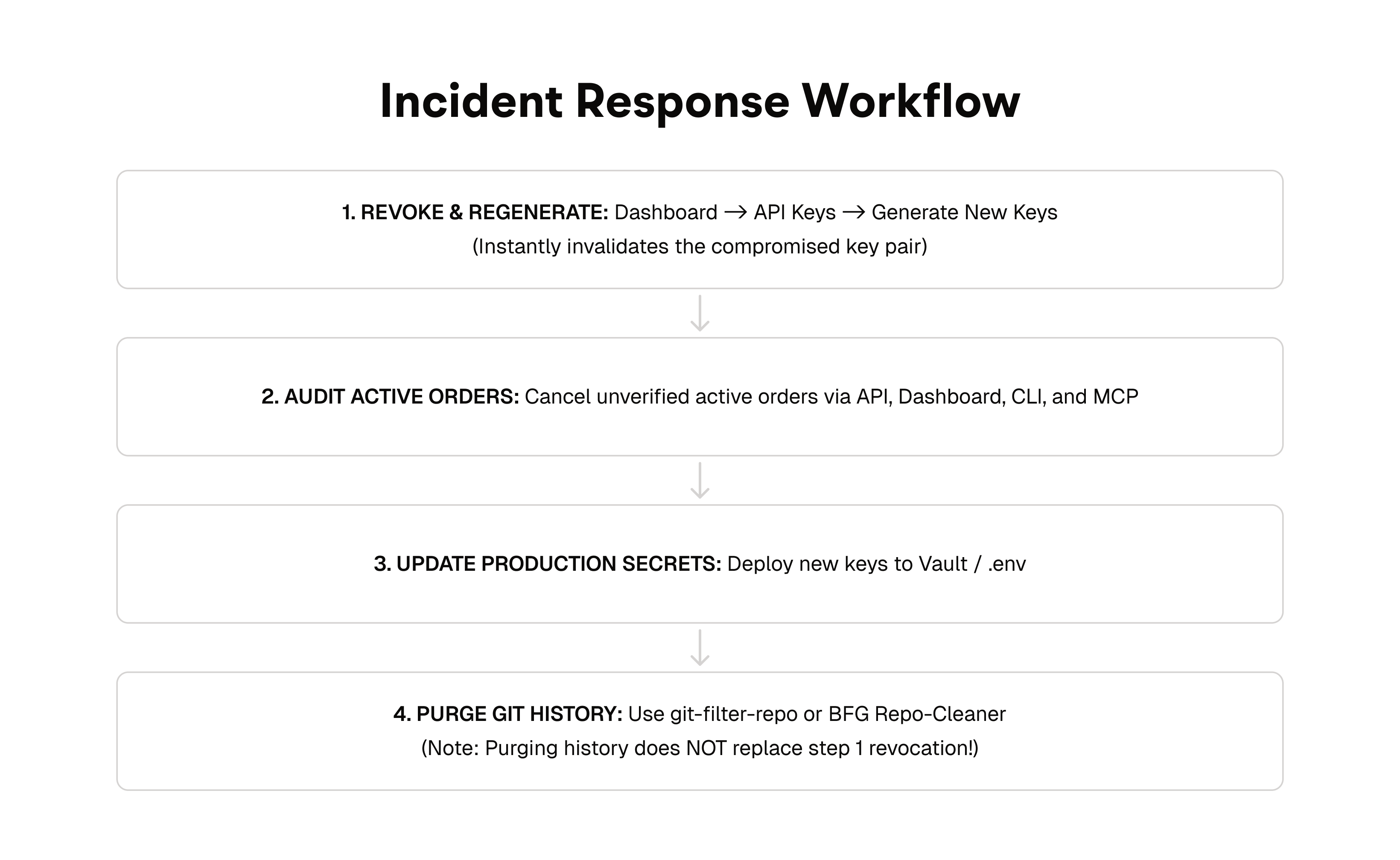
Step 1: Revoke the Compromised Key Pair
- Log in to the Alpaca Dashboard
- Navigate to the API Keys section.
- Click Regenerate, then confirm by clicking Generate New Keys.
- Generating new keys invalidates the existing key pair. Any active scripts using the old secret will receive
HTTP 401 Unauthorizedresponses.
Step 2: Audit Account Positions and Orders
- Inspect the Orders tab on the dashboard.
- Cancel any pending or unverified orders submitted during the exposure window.
- Verify account balance and positions against expected strategy holdings.
Step 3: Verify the New Key Pair
- Update your local
.envor production secret manager with the new credentials. - Confirm that requests using the new pair succeed on the intended host.
- Confirm that requests using the old compromised pair fail with
HTTP 401 Unauthorized
Step 4 (optional): Purge historical commits - only after regeneration
Only consider this after Step 1 (dashboard key regeneration), Step 2 (update every environment), and Step 3 (confirm the old pair returns 401). History rewriting does not revoke access. Existing clones, forks, and caches can still hold the old objects.
Use this on a repository you fully control, typically a solo project or one where you can coordinate every collaborator. On a shared remote, a force push rewrites history for everyone and can break open PRs.
# Install git-filter-repo
pip install git-filter-repo
# Permanently purge .env from all historical commits (local rewrite)
git-filter-repo --invert-paths --path .env --force
If you own the remote and every collaborator can re-clone or reset:
# Coordinate first — destructive on a shared remote
git push origin --force --all
git push origin --force --tags # if you use tagsImportant: Treat history cleanup as optional hygiene after regeneration, not a substitute for it. Step 1 is mandatory. Anyone who cloned before the rewrite may still have the secret locally.
Production Security Checklist
Audit your development and deployment workflows against this pre-flight checklist:
- [ ] No Hardcoded Secrets: Zero API key strings exist in source files, Jupyter notebooks, or commit history.
- [ ] Gitignore Configured:
.envand local credential files are explicitly listed in.gitignore. - [ ] Host Context Verified: Code connects to
https://paper-api.alpaca.marketsduring development and testing. - [ ] Least-Privilege Environment: Production deployments use secret managers (AWS Secrets Manager, Vault) rather than static files.
- [ ] Incident Protocol Ready: Know the
git-filter-repoworkflow for purging committed secrets, only after regeneration, and only on repos you fully control
Additional Resources & Documentation
- Alpaca Trading API Authentication Reference
- Troubleshooting Errors
- Getting Started with Paper Trading
- Paper Trading Vs Live Trading
- Alpaca Python SDK on GitHub
- Alpaca Support Portal
Please note that this article is for educational and general informational purposes only. Live trading involves risk, including the possibility of rapid financial loss from unauthorized or unintended activity. The security practices described in this article are intended to reduce, but do not eliminate, the risk of credential compromise, and following them does not guarantee the security of any account, key, or system. You are responsible for safeguarding your own API credentials and infrastructure.
Securities trading is offered by Alpaca Securities LLC (dba "Alpaca Clearing"). Crypto trading is offered by Alpaca Crypto LLC.
The Paper Trading API is offered by AlpacaDB, Inc. and does not require real money or permit a user to transact in real securities in the market. Providing use of the Paper Trading API is not an offer or solicitation to buy or sell securities, securities derivative or futures products of any kind, or any type of trading or investment advice, recommendation or strategy, given or in any manner endorsed by AlpacaDB, Inc. or any AlpacaDB, Inc. affiliate.
Information and outputs generated through Alpaca’s CLI, MCP Server, or connected AI agents are provided for educational and informational purposes only and do not constitute investment advice or a recommendation to buy, sell, or hold any security or cryptocurrency. AI-generated outputs may contain errors, omissions, or inaccuracies and should be independently reviewed and verified before use or reliance. Alpaca does not recommend any specific security, cryptocurrency, or investment strategy. Users should conduct their own due diligence before making investment decisions. All firms mentioned operate independently and are not responsible for one another's products or services.
Securities brokerage services are provided by Alpaca Securities LLC ("Alpaca Securities"), member FINRA/SIPC, a wholly-owned subsidiary of AlpacaDB, Inc. Technology and services are offered by AlpacaDB, Inc.
Cryptocurrency services are made available by Alpaca Crypto LLC ("Alpaca Crypto"), a FinCEN registered money services business (NMLS # 2160858), and a wholly-owned subsidiary of AlpacaDB, Inc. Alpaca Crypto is not a member of SIPC or FINRA.
This is not an offer, solicitation of an offer, or advice to buy or sell securities or cryptocurrencies or open a brokerage account or cryptocurrency account in any jurisdiction where Alpaca Securities or Alpaca Crypto, respectively, are not registered or licensed, as applicable.