This blog was last updated on January 26, 2026.
In this tutorial series, we will learn about how to fund your live trading account. We will assume that your application for a live trading account has already been approved. If you have not, please check out the tutorial guides on How to open a live trading account as a US resident? or How to open a live trading account as a non-US resident?
To understand more about Alpaca’s Trading API capabilities, explore the following resources:
- How to Get Alpaca’s Trading API Key and Start Connecting
- How to Start Paper Trading with Alpaca’s Trading API
- How to Connect Your Alpaca’s Trading API Account with TradingView
- How to Trade an Option Strategy on TradingView with Alpaca
- How to Build Options Trading Algorithms with Alpaca’s MCP Server and Cursor AI
Step 1: Navigate to the Funding Page
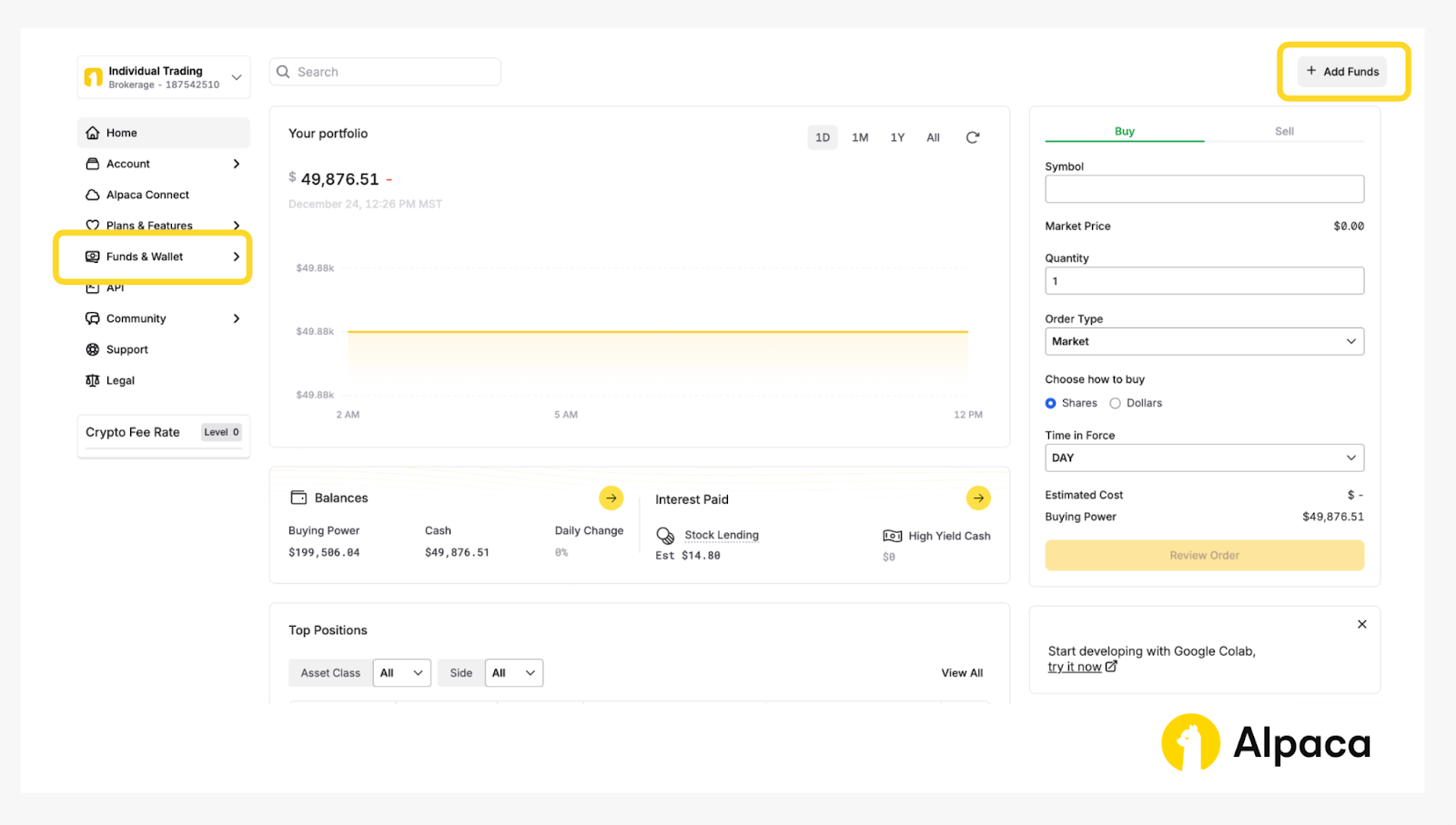
After logging in to your Alpaca account, go to the live trading account overview. Click the ‘Funds & Wallet’ tab on the left or the ‘Add Funds’ button on the top right to open the funding page. The account overview should look somewhat like the following:
Step 2: Select Funding Method and Deposit
On the funding page, you can link your bank account to your profile. We offer the following funding methods.
- ACH (Bank accounts in USD)
- Local Currency Transfer
- Wire transfer (domestic and international)
- Crypto Transfers
We introduce ACH and local currency transfer via Currencycloud for this tutorial.
Step 2-A: Deposit via ACH (US Bank Accounts)
U.S. residents typically fund their Alpaca's Trading API accounts through direct bank transfer (ACH).
Note: Currently users cannot programmatically schedule deposits or withdraw funds at this time.
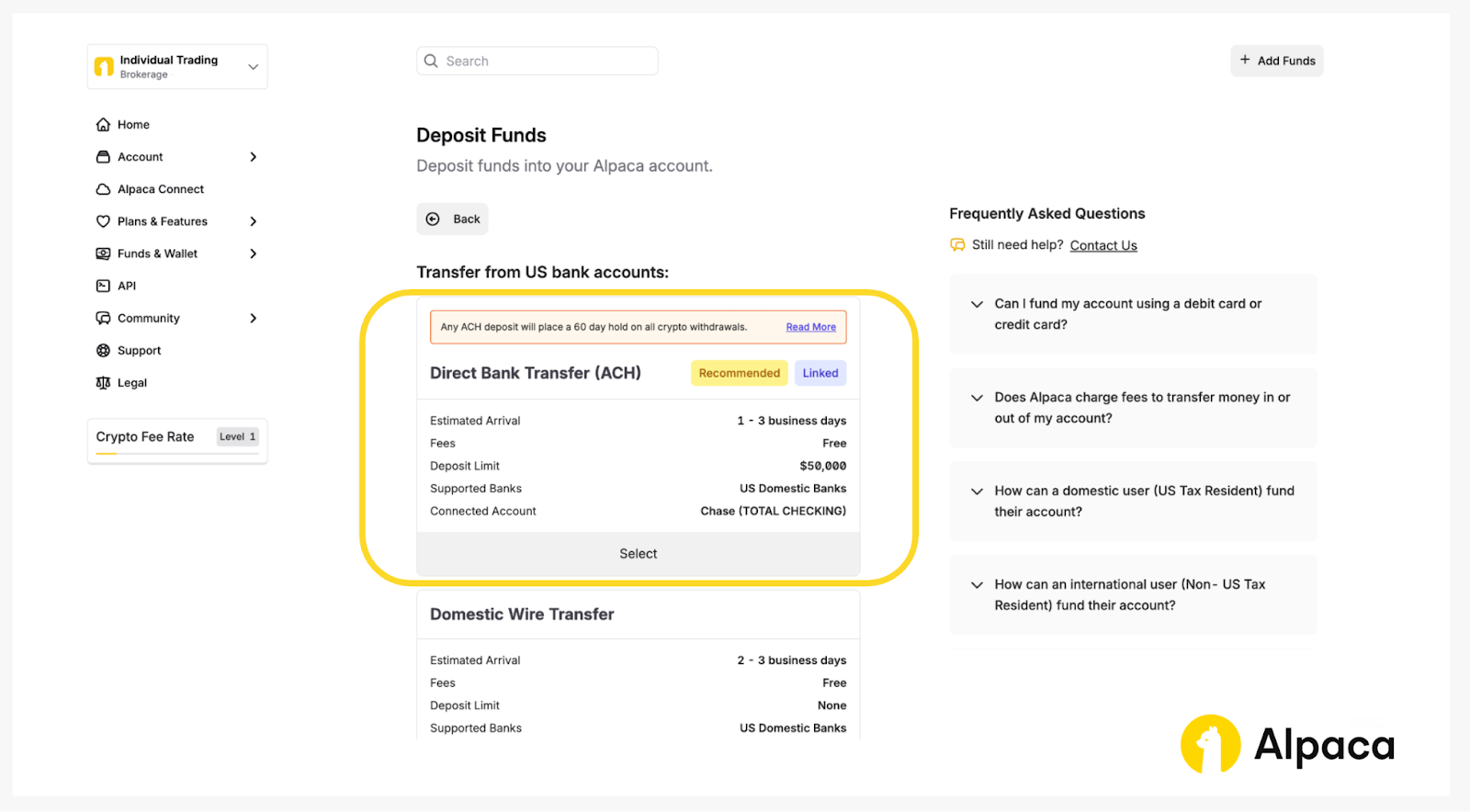
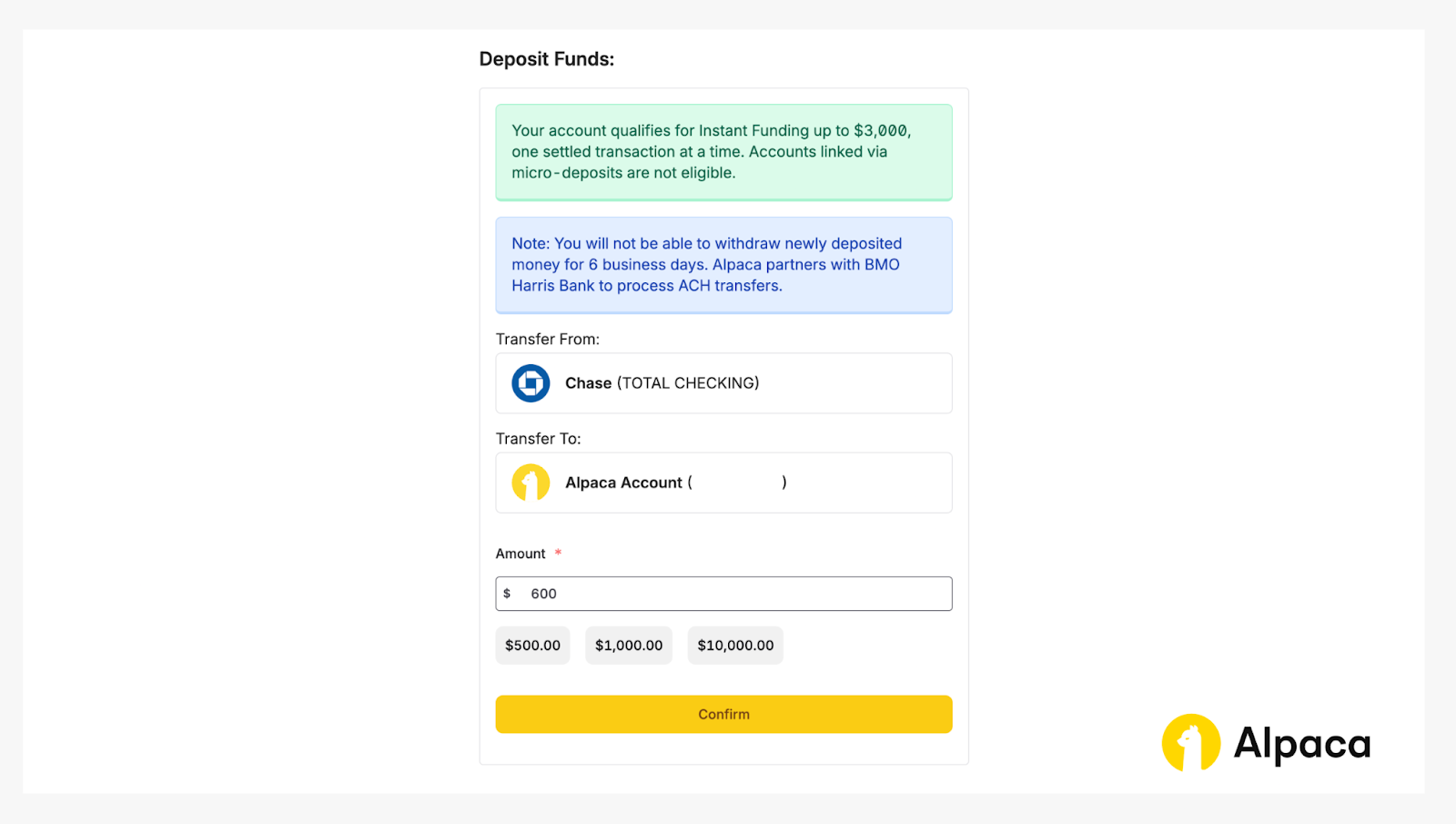
After linking your bank account (e.g., Chase), select the amount you wish to deposit and click 'Deposit' to add funds to your account.
Step 2-B: Deposit via CurrencyCloud (International Currencies)
International users can send funds in their local currency to a CurrencyCloud wallet. Once converted to USD, the funds are deposited into the Alpaca's Trading API account available for trading.
Access your dashboard and select ‘Local Currency Transfer.’
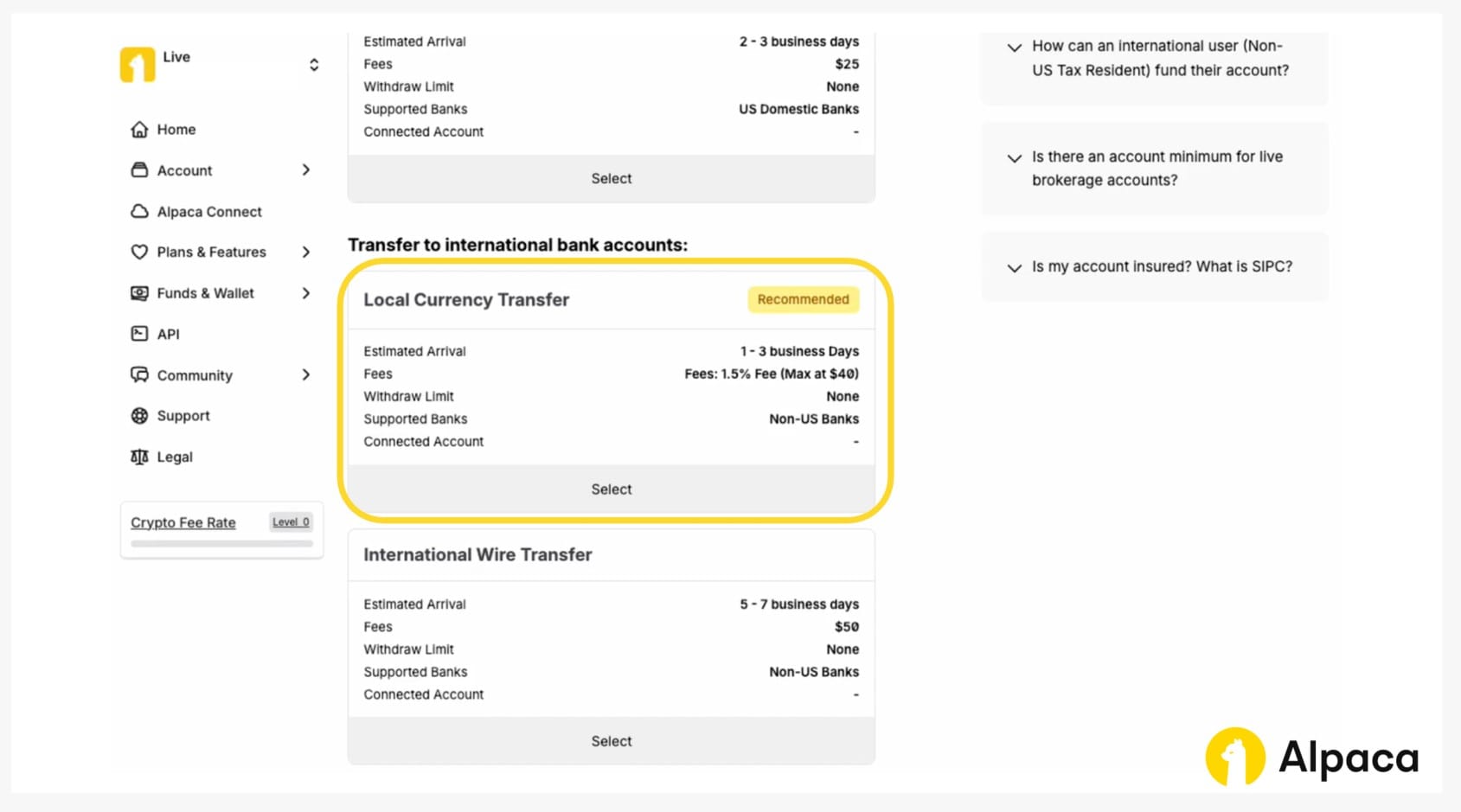
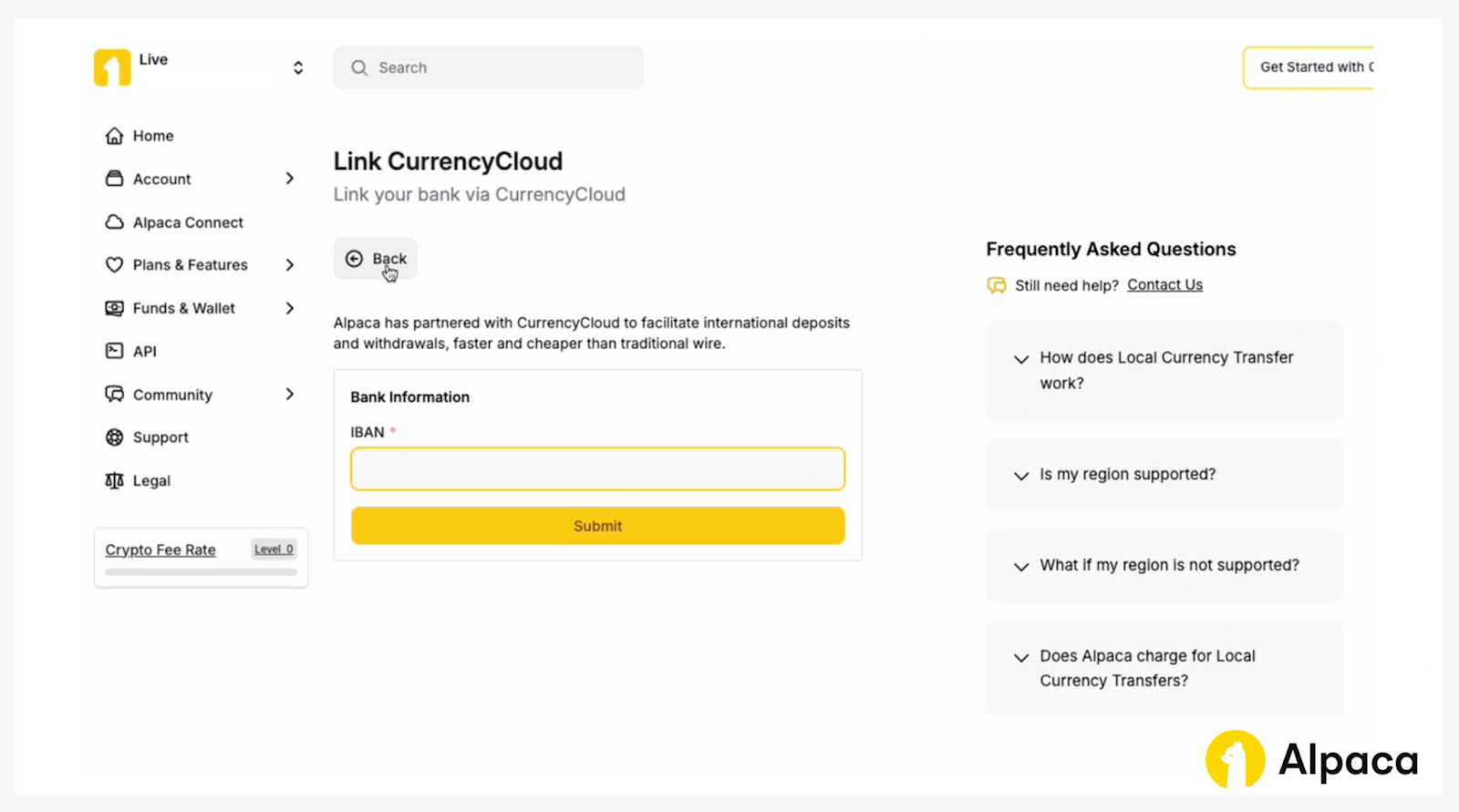
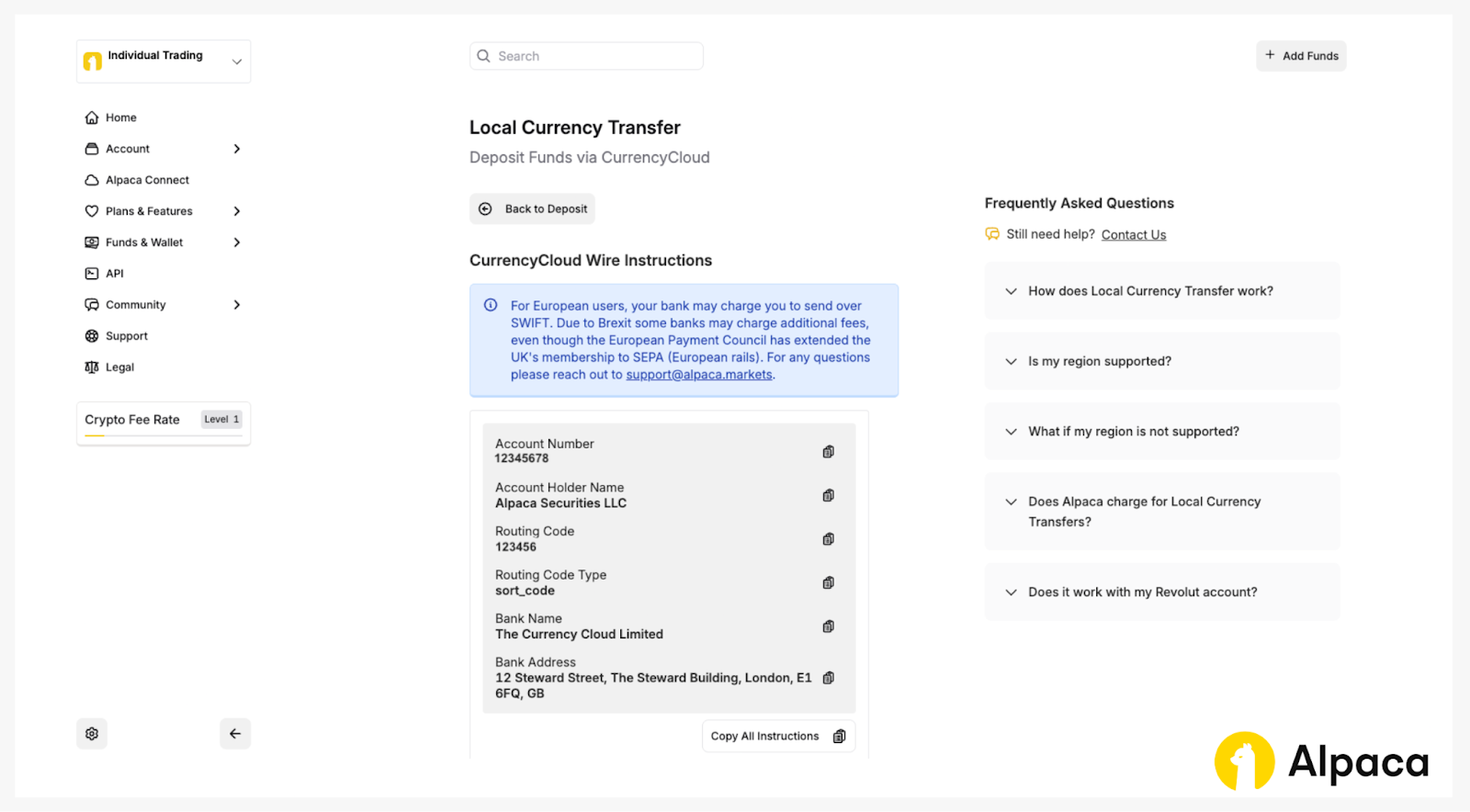
From there, you can link your bank through CurrencyCloud. For the initial setup, you’ll need to provide your International Bank Account Number (IBAN). Once the bank is successfully entered, the system will create a new currency funding wallet and provide you with the wire transfer details.
After connecting your bank, you will see the CurrencyCloud wire instructions, as shown in the example below. You can use these details to transfer your funds to your Alpaca’s Trading API account. These details are generated based on your residency and the currency of your country and are specific to your Alpaca's Trading API account.
Note: You must send a currency that your bank account supports. For example, if your bank account is a Euro account, you must send euros and not a different currency for the transfer to be successful.
Step 2-C: Deposit via Wire transfer (Domestic and International)
You can also deposit via wire transfer. We support both domestic and international wire transfers. Access your dashboard and select ‘Domestic Wire Transfer’ if you are sending it from a US bank account; otherwise, select ‘International Wire Transfer’ for international bank accounts.
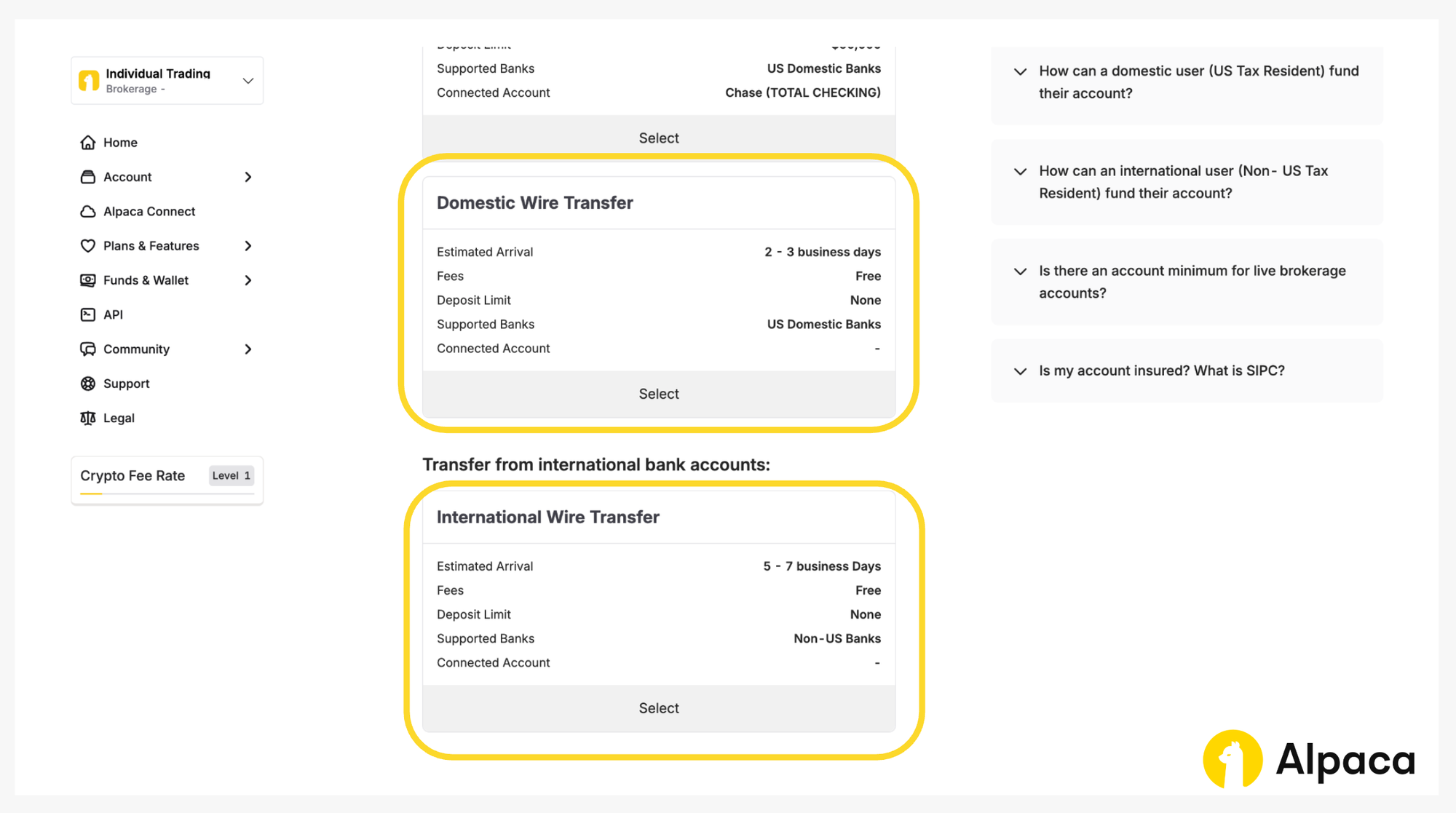
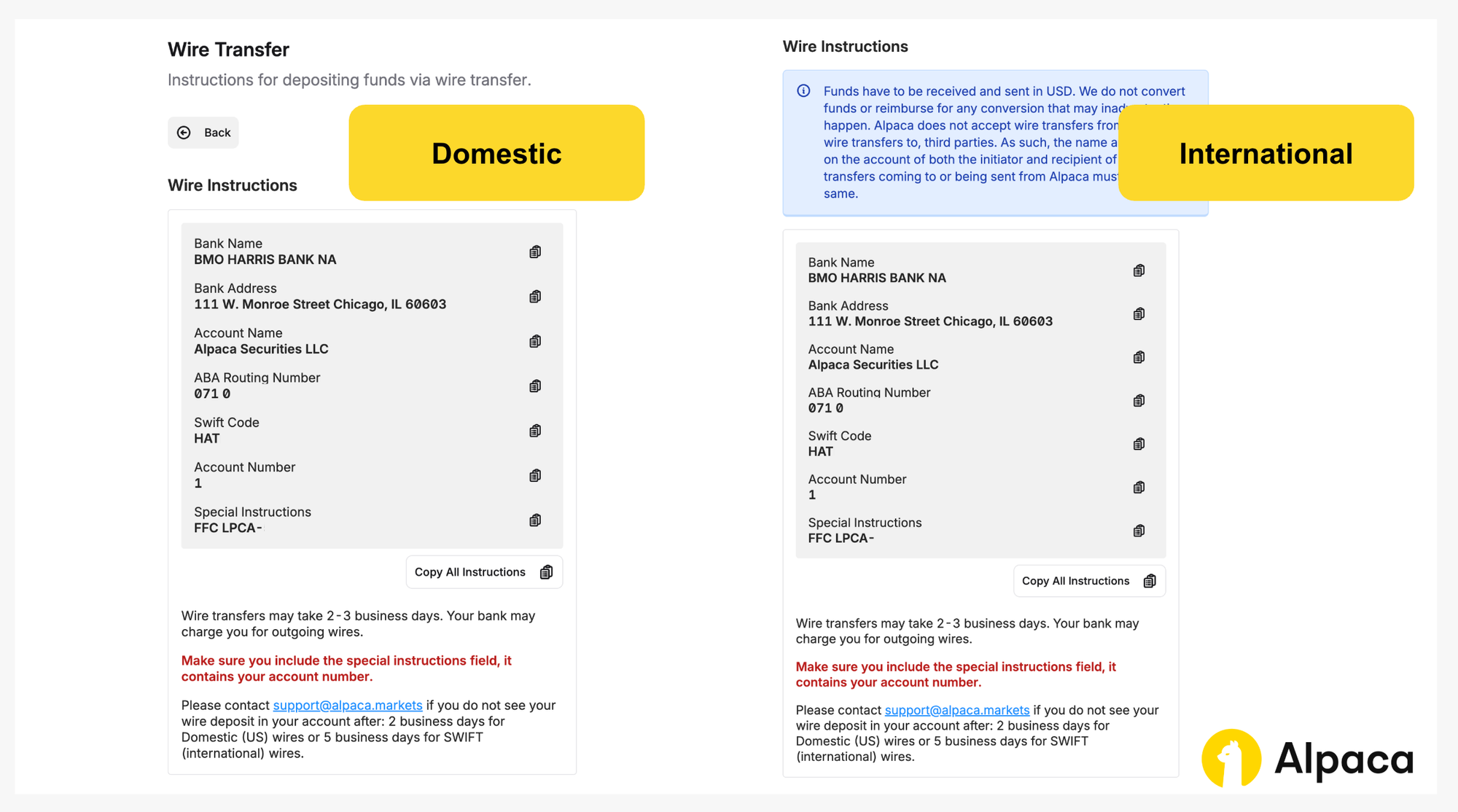
From there, you will see wire instructions similar to those shown below.
Note: If you are sending funds from an international bank, the wire must be sent in USD. Alpaca does not accept wires in other currencies. If your bank cannot send USD wires, we recommend using CurrencyCloud instead.
Step 2-D: Crypto Transfers
You can transfer crypto currencies from different wallets. Access your dashboard and select ‘Crypto Transfers.’
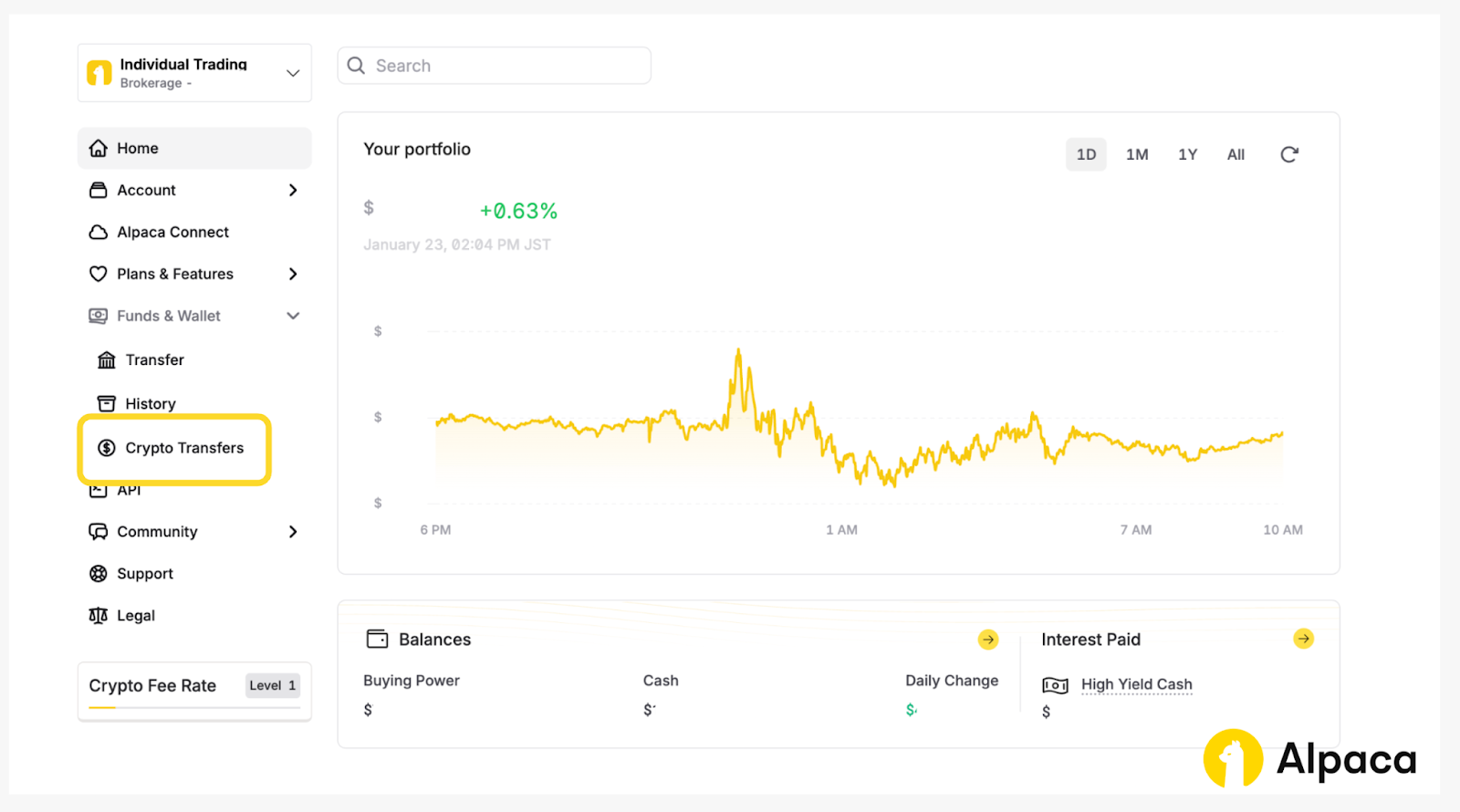
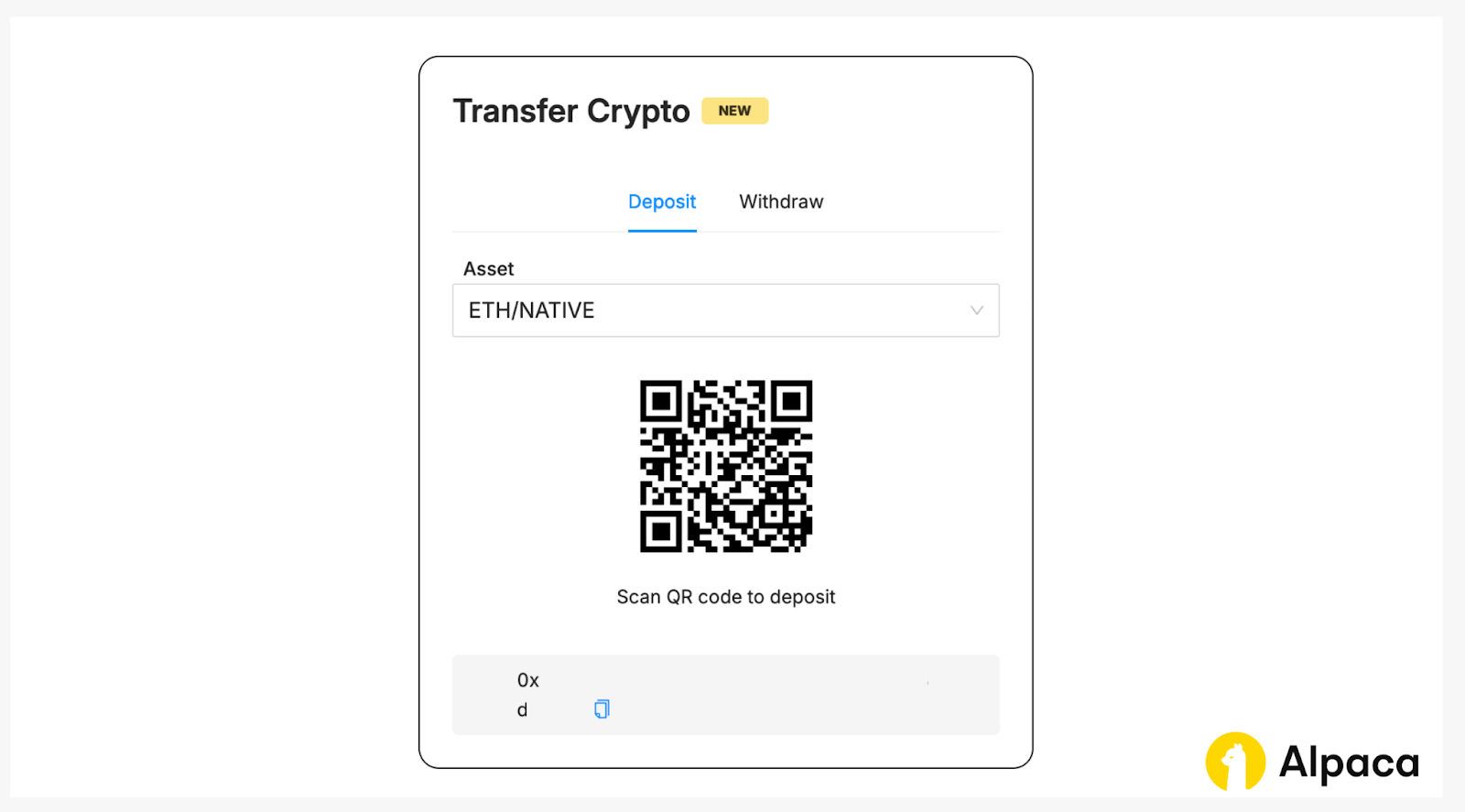
You should see a panel where you can select Deposit and Asset. For example, you can choose ‘ETH/NATIVE,’ ‘BTC/NATIVE,’ and more. You can either scan the QR code to make a deposit or send funds from another wallet using the provided address. After sending, enter the transaction ID (hash) from the sending wallet to confirm that your crypto has been transferred to Alpaca’s wallet.
Step 3: Verify Deposit
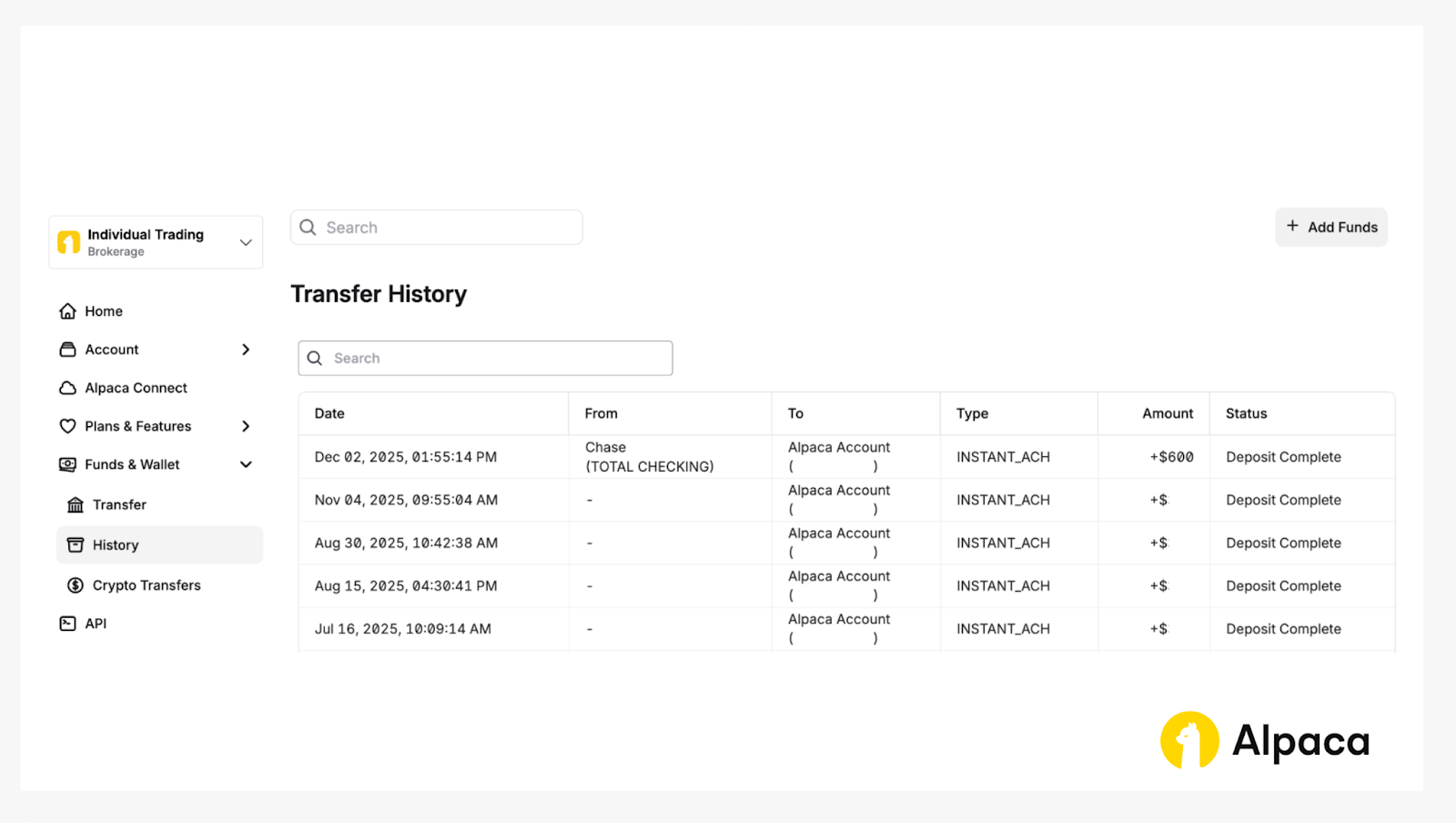
You can verify the amount of money you have deposited into your account, by going into the ‘Verify History’ page or account overview.
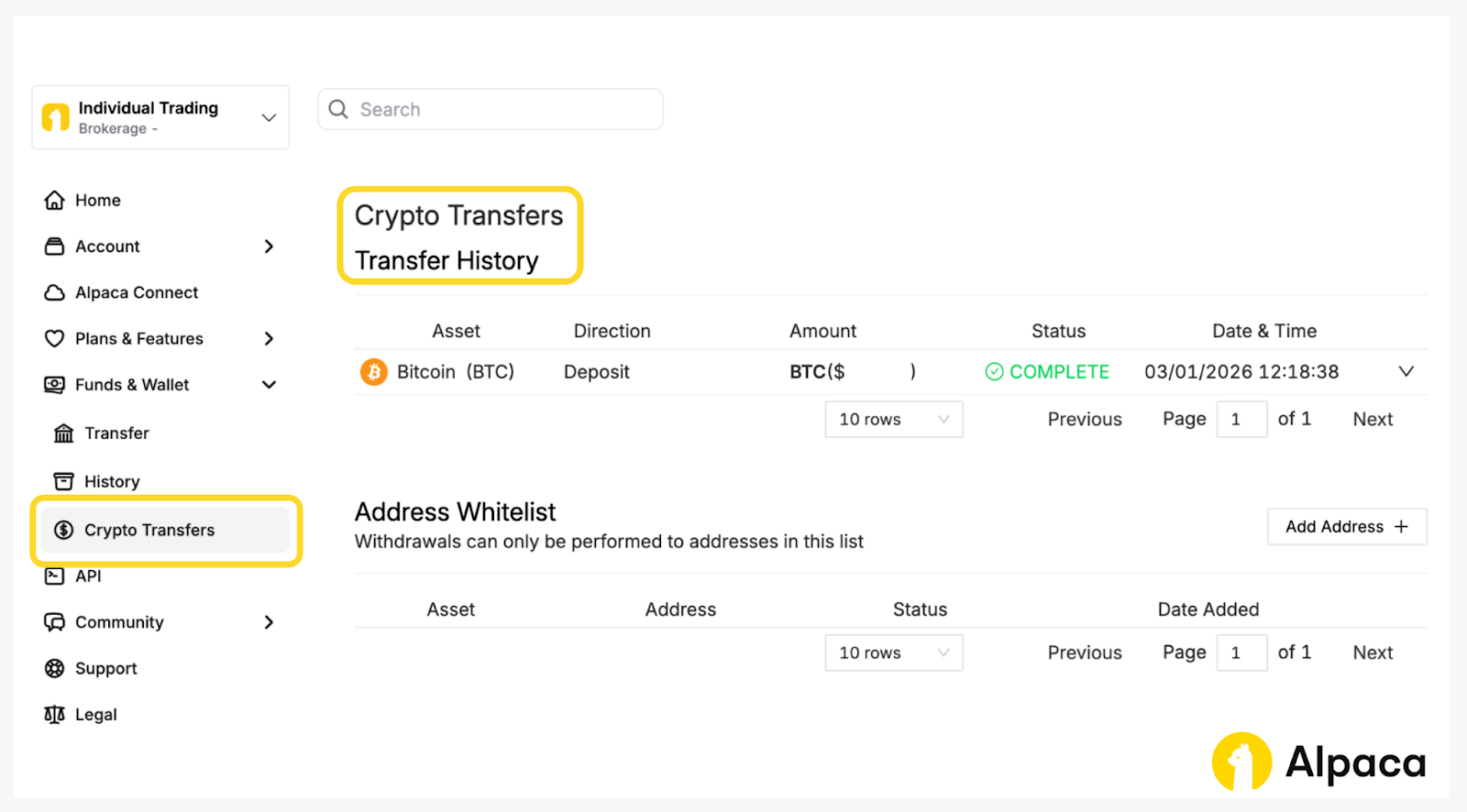
For crypto transfers, you can view the transfer history on the ‘Crypto Transfers’ page under the ‘Funds & Wallet’ tab.
Once your account funding is confirmed, you’re ready to start live trading!
Conclusion
With your Alpaca's Trading API account, you can connect to TradingView for manual trading or execute algorithmic strategies via the Trading API
For more on integrating options trading with Alpaca's Trading API account and TradingView, check out How to Connect Your Alpaca's Trading API Account with TradingView.
If you’d like to learn more about trading algorithmically with Alpaca's Trading API, explore the resources below:
FAQ
How do I fund my Alpaca account?
To fund an Alpaca's live trading account, log in to your Alpaca's dashboard and navigate to the Funds & Wallet tab on the left hand sidebar. On that page, you will see several funding options. Choose the one that best suits your needs depending on your location and bank. Note that deposits and withdrawals are handled through the Alpaca's web portal and not via the API.
What funding methods are supported?
We offer the following methods:
- ACH (bank accounts in USD)
- Wire transfer (domestic and international)
- Local currency transfer
- Crypto transfers
Is my deposited cash available immediately for trading?
In some cases, funds may be available for trading before they fully settle. For ACH transfers, up to 3000 USD may be made available instantly, allowing you to begin trading immediately. All other transfer methods require the funds to be fully transferred and posted to your account before trading is permitted.
Are there any fees for depositing or withdrawing money?
ACH deposits and withdrawals are free. For international funding through Currencycloud, there is a 1.5% fee (capped at 40 USD) on both incoming and outgoing transfers. Outgoing domestic wires cost 25 USD per transaction, while international outgoing wires are 50 USD.
Can I fund my account from someone else's bank account?
No. For security and compliance reasons, bank accounts must be in your name to be linked and used for funding.
Why did my deposit fail or get reversed?
Deposits may fail or be reversed for reasons such as:
- Insufficient funds
- Bank account name mismatch
- Bank side restrictions
- Incorrect account details
For further information or clarification, please reach out to your banking institution or our support team: [email protected].
Why was my withdrawal declined?
Declines often happen because the request exceeds your withdrawable balance once fees are factored in. For wire transfers and local currency transfers, you must leave enough cash to cover the fee, as it is charged as a separate line item.
Does Alpaca provide tax reports for Trading API users?
Yes. Alpaca generates tax documents for Trading API users based on account type and reportable activity.
Does Alpaca support Crypto Wallets?
Yes, Alpaca now offers Crypto Wallets as a convenient way for users to deposit and withdraw crypto assets.
Where can I find Crypto Wallet in Alpaca?
Crypto Wallets are available to users in select international jurisdictions and US states. Any Alpaca user who has signed the crypto agreement and is located in a supported region is eligible. Users cover underlying network fees. Alpaca does not charge additional deposit fees.
Why can't I find the Crypto Transfers screen?
Crypto Wallets are only available in select international jurisdictions and US states. Availability depends on your location.
What enables a user to be qualified to use crypto wallets?
Any Alpaca user located in a supported region with a valid crypto account and signed crypto agreement is eligible.
What assets and blockchains does Alpaca support for crypto deposits and withdrawals?
Alpaca supports Bitcoin (BTCUSD), Ethereum (ETHUSD), and all Ethereum (ERC-20) based tokens for deposits and withdrawals.
The Paper Trading API is offered by AlpacaDB, Inc. and does not require real money or permit a user to transact in real securities in the market. Providing use of the Paper Trading API is not an offer or solicitation to buy or sell securities, securities derivative or futures products of any kind, or any type of trading or investment advice, recommendation or strategy, given or in any manner endorsed by AlpacaDB, Inc. or any AlpacaDB, Inc. affiliate and the information made available through the Paper Trading API is not an offer or solicitation of any kind in any jurisdiction where AlpacaDB, Inc. or any AlpacaDB, Inc. affiliate (collectively, “Alpaca”) is not authorized to do business.
Please note that this article is for general informational purposes only and is believed to be accurate as of the posting date but may be subject to change. The examples above are for illustrative purposes only.
Options trading is not suitable for all investors due to its inherent high risk, which can potentially result in significant losses. Please read Characteristics and Risks of Standardized Options before investing in options.
Securities brokerage services are provided by Alpaca Securities LLC ("Alpaca Securities"), member FINRA/SIPC, a wholly-owned subsidiary of AlpacaDB, Inc. Technology and services are offered by AlpacaDB, Inc.
Cryptocurrency services are made available by Alpaca Crypto LLC ("Alpaca Crypto"), a FinCEN registered money services business (NMLS # 2160858), and a wholly-owned subsidiary of AlpacaDB, Inc. Alpaca Crypto is not a member of SIPC or FINRA. Cryptocurrencies are not stocks and your cryptocurrency investments are not protected by either FDIC or SIPC. Please see the Disclosure Library for more information.
Cryptocurrency is highly speculative in nature, involves a high degree of risks, such as volatile market price swings, market manipulation, flash crashes, and cybersecurity risks. Cryptocurrency regulations are continuously evolving, and it is your responsibility to understand and abide by them. Cryptocurrency trading can lead to large, immediate and permanent loss of financial value. You should have appropriate knowledge and experience before engaging in cryptocurrency trading. For additional information, please click here.
This is not an offer, solicitation of an offer, or advice to buy or sell securities or cryptocurrencies or open a brokerage account or cryptocurrency account in any jurisdiction where Alpaca Securities or Alpaca Crypto, respectively, are not registered or licensed, as applicable.