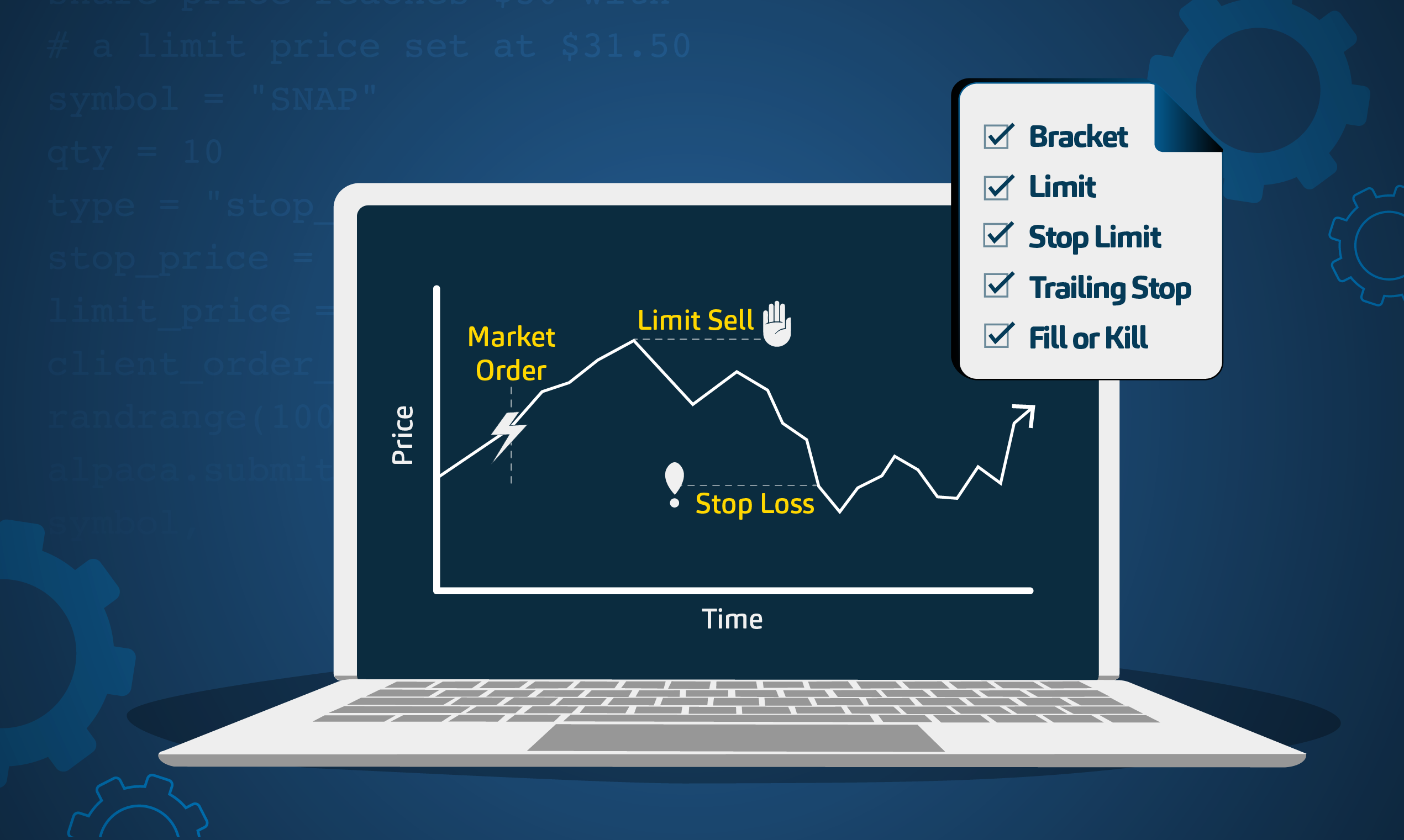
Trading stocks, options, and crypto involves choices about price, timing, and execution. Order types make those choices explicit, but if you’re not familiar with trading, understanding order type terminology can be intimidating. This guide explains the various order types available through Alpaca’s Trading API, plus the time-in-force settings that govern when an order expires.
This content is for informational purposes only and does not constitute investment advice or a recommendation to buy or sell any security. Alpaca does not provide investment recommendations, and all examples are for illustrative purposes only. Investors should consider their own objectives and risk tolerance before making investment decisions. Options trading is not suitable for all investors due to its inherent high risk, which can potentially result in significant losses. Please read Characteristics and Risks of Standardized Options before investing in options.
You will see a short Python example for each order type and time-in-force option. These examples use the alpaca-py TradingClient and are for educational purposes only. More example source code for the client is in this GitHub repo.
To get the most out of this guide, explore the following resources first:
Getting Started with Alpaca’s Trading API
To place orders with Alpaca, you need an account and API keys. After you create an account, follow this guide to locate your API keys. Then, install the alpaca-py client library using the GitHub instructions.
The examples below assume you have initialized the client and are using paper trading. Paper trading simulates order submission and is useful for testing logic before any live deployment is considered.
# Importing alpaca-py trading client and request models
from alpaca.trading.client import TradingClient
from alpaca.trading.enums import OrderSide, OrderType, TimeInForce, OrderClass
from alpaca.trading.requests import (
    MarketOrderRequest,
    LimitOrderRequest,
    StopOrderRequest,
    StopLimitOrderRequest,
    TrailingStopOrderRequest,
    TakeProfitRequest,
    StopLossRequest,
)

ALPACA_API_KEY = "<Your API Key>"
ALPACA_API_SECRET = "<Your Secret Key>"

trade_client = TradingClient(ALPACA_API_KEY, ALPACA_API_SECRET, paper=True)
All order examples use alpaca-py order request models and trade_client.submit_order. See OrderRequest, TimeInForce, and Create Order for field definitions. The symbol is required. If you submit live orders, consider additional checks such as buying power, market hours, and existing positions.
The Five Basic Order Types
Basic order types cover the most common ways to buy or sell a security. Each has tradeoffs between speed, price control, and fill certainty.
Order Type Scope and Constraints
The Trading API documents five core order types: market, limit, stop, stop limit, and trailing stop. Trailing stops are supported but documented separately. Before an IPO begins trading on an exchange, Alpaca accepts only limit orders for that symbol. For extended-hours trading, orders must be limit orders with time_in_force set to DAY or GTC, and extended_hours set to True. See Order Types, Trailing Stop Orders, and IPO Symbols.
Market Orders
A market order attempts to buy or sell at the best available price. It does not guarantee the execution price and can fill at a worse price during fast moves or low liquidity. You can submit a market order by share quantity (qty) or by notional value (notional), but not both.
Note: Please note that we are using SPY as an example, and it should not be considered investment advice.
# Submitting a market buy order by quantity and by notional
symbol = "SPY"
quantity = 10
notional = 4500

order_request_qty = MarketOrderRequest(
    symbol=symbol,
    qty=quantity,
    side=OrderSide.BUY,
    type=OrderType.MARKET,
    time_in_force=TimeInForce.DAY,
)
trade_client.submit_order(order_request_qty)

order_request_notional = MarketOrderRequest(
    symbol=symbol,
    notional=notional,
    side=OrderSide.BUY,
    type=OrderType.MARKET,
    time_in_force=TimeInForce.DAY,
)
trade_client.submit_order(order_request_notional)
Limit Orders
A limit order sets a specific price or better. A buy limit order executes at the limit price or lower, and a sell limit order executes at the limit price or higher. Limit orders offer price control but may not fill if the market never reaches your price.
# Submitting a limit sell order for $SPY at a minimum price
symbol = "SPY"
quantity = 10
limit_price = 900

order_request = LimitOrderRequest(
    symbol=symbol,
    qty=quantity,
    side=OrderSide.SELL,
    type=OrderType.LIMIT,
    time_in_force=TimeInForce.DAY,
    limit_price=limit_price,
)
trade_client.submit_order(order_request)
Limit Orders - 24/5 Trading
For US equities traded in the overnight session, Alpaca supports limit orders with TimeInForce.DAY or TimeInForce.GTC and extended_hours=True. The example below shows a GTC limit buy for an SPY share during 24/5 trading. See How to Trade 24/5 with Alpaca’s Trading API for details.
# Submitting a 24/5 GTC limit buy for $SPY
symbol = "SPY"
quantity = 1
limit_price = 900

order_request = LimitOrderRequest(
    symbol=symbol,
    qty=quantity,
    side=OrderSide.BUY,
    type=OrderType.LIMIT,
    time_in_force=TimeInForce.GTC,
    limit_price=limit_price,
    extended_hours=True,
)
trade_client.submit_order(order_request)
Stop Orders
A stop (market) order becomes active once the price reaches a specified stop level. After the stop is triggered, the order becomes a market order and can be filled at the next available price, which may differ from the stop price. This can help manage entries or exits but does not guarantee the execution price.
# Submitting a stop buy order for $SPY triggered at $900
symbol = "SPY"
quantity = 5
stop_price = 900

order_request = StopOrderRequest(
    symbol=symbol,
    qty=quantity,
    side=OrderSide.BUY,
    type=OrderType.STOP,
    time_in_force=TimeInForce.DAY,
    stop_price=stop_price,
)
trade_client.submit_order(order_request)
Stop-Limit Orders
A stop-limit order combines a stop price and a limit price. When the stop price is reached, the order becomes a limit order. This can provide more price control than a stop order, but the order may not fill if the limit price is not available after the stop triggers.
# Submitting a stop-limit buy order for $SPY
symbol = "SPY"
quantity = 10
stop_price = 900
limit_price = 950

order_request = StopLimitOrderRequest(
    symbol=symbol,
    qty=quantity,
    side=OrderSide.BUY,
    type=OrderType.STOP_LIMIT,
    time_in_force=TimeInForce.GTC,
    stop_price=stop_price,
    limit_price=limit_price,
    extended_hours=False,
)
trade_client.submit_order(order_request)
Trailing Stop Orders
A trailing stop order uses a moving stop price based on a dollar or percentage trail. As the price moves in your favor, the stop adjusts with it. If the price reverses and hits the trailing stop level, the order becomes a market order. Trailing stops can reduce manual monitoring but still carry execution price risk. Trailing stop orders require trail_price or trail_percent, only support DAY and GTC, and do not trigger outside regular market hours. Trailing stops are currently supported only as single orders.
# Submitting a trailing stop buy order for $SPY
symbol = "SPY"
quantity = 10
trail_percent = 5

order_request = TrailingStopOrderRequest(
    symbol=symbol,
    qty=quantity,
    side=OrderSide.BUY,
    type=OrderType.TRAILING_STOP,
    time_in_force=TimeInForce.GTC,
    trail_percent=trail_percent,
    extended_hours=False,
)
trade_client.submit_order(order_request)
Advanced Order Types
Advanced order types chain multiple orders to manage entry and exit conditions. These can support certain risk management approaches but may also introduce execution and complexity risks, so validate logic carefully in paper trading.
Advanced Order Constraints
OCO orders must use type="limit". For bracket, OCO, and OTO orders, take_profit and stop_loss fields must follow the required structure and cannot be omitted. OTO order replacement is not currently supported. Bracket orders do not support extended hours, and time_in_force must be DAY or GTC. For stop-loss legs on advanced orders, stop price inputs must be at least $0.01 away from the base price as defined in the API documentation. Review threshold on stop price of stop-loss orders.
Bracket Orders
A bracket order places an entry order plus two exit orders: a take-profit limit and a stop-loss (stop or stop-limit). Only one exit order can be filled. The other is canceled when the first fills. In fast markets, cancellation timing can affect outcomes, so monitor for unexpected behavior. Read more about Bracket Orders.
# A bracket buy order for $SPY with take-profit and stop-loss
symbol = "SPY"
quantity = 10
limit_price = 900

order_request = LimitOrderRequest(
    symbol=symbol,
    qty=quantity,
    side=OrderSide.BUY,
    type=OrderType.LIMIT,
    time_in_force=TimeInForce.GTC,
    limit_price=limit_price,
    order_class=OrderClass.BRACKET,
    take_profit=TakeProfitRequest(limit_price=limit_price * 1.10),
    stop_loss=StopLossRequest(stop_price=limit_price * 0.95),
)
trade_client.submit_order(order_request)
One-Cancels-Other Orders (OCO)
OCO orders are a pair of exit orders for an existing position. When one order fills, the other is canceled. Alpaca supports OCO orders to exit a position. As with bracket orders, cancellation timing can matter in fast markets. Read more about OCO Orders.
# An OCO exit order for $SPY
symbol = "SPY"
quantity = 5

order_request = LimitOrderRequest(
    symbol=symbol,
    qty=quantity,
    side=OrderSide.SELL,
    type=OrderType.LIMIT,
    time_in_force=TimeInForce.GTC,
    order_class=OrderClass.OCO,
    take_profit=TakeProfitRequest(limit_price=950),
    stop_loss=StopLossRequest(stop_price=880, limit_price=880),
)
trade_client.submit_order(order_request)
One-Triggers-Other Orders (OTO)
OTO orders place an entry order plus a single conditional exit order. This is useful when you want either a stop-loss or a take-profit but not both. Read more about OTO Orders.
# An OTO order for $SPY with a stop-loss
symbol = "SPY"
quantity = 5

order_request = MarketOrderRequest(
    symbol=symbol,
    qty=quantity,
    side=OrderSide.BUY,
    type=OrderType.MARKET,
    time_in_force=TimeInForce.GTC,
    order_class=OrderClass.OTO,
    stop_loss=StopLossRequest(stop_price=880),
)
trade_client.submit_order(order_request)
Time in Force (TIF)
Time_in_force defines when an order expires. Every order must have a time-in-force value. If you do not set one explicitly, the API applies a default; see Time in Force and Order Types vs Supported Time in Force for your asset class and order type. Time in force is not an order type, but it can materially change order behavior.
TIF Availability and API Version Notes
Time-in-force support varies by asset class and order type. For crypto trading, Alpaca supports only GTC and IOC. Extended-hours orders are limited to limit orders with day or GTC, and extended_hours=true. Options orders have narrower TIF support than equities. Some TIF values are available only in API v2, including IOC, FOK, and CLS. See Time in Force and Order Types vs Supported Time in Force. Please note that OPG and CLS orders are only available to Elite Smart Router users.
Day
Day — Whole Quantity Orders (USD)
Day orders are eligible for execution only on the day they are submitted. By default, they are active during regular trading hours (9:30am to 4:00pm ET). If unfilled after the closing auction, they are canceled. Day orders submitted after the close are queued for the next trading day. If eligible for extended hours, they can execute during supported sessions.
# Submitting a day limit buy for $SPY
symbol = "SPY"
quantity = 10
limit_price = 880

order_request = LimitOrderRequest(
    symbol=symbol,
    qty=quantity,
    side=OrderSide.BUY,
    type=OrderType.LIMIT,
    time_in_force=TimeInForce.DAY,
    limit_price=limit_price,
)
trade_client.submit_order(order_request)
Day — Fractional Orders (USD)
For fractional USD equities orders, DAY is the supported time-in-force value. You can still use the core order types (market, limit, stop, and stop limit) with a fractional quantity. The example below shows a fractional stop order using TimeInForce.DAY.
# Fractional stop order (USD equities, Day only)
symbol = "SPY"
quantity = 0.5
stop_price = 900

order_request = StopOrderRequest(
    symbol=symbol,
    qty=quantity,
    side=OrderSide.BUY,
    type=OrderType.STOP,
    time_in_force=TimeInForce.DAY,
    stop_price=stop_price,
)
trade_client.submit_order(order_request)
Good-Til-Canceled (GTC)
GTC orders remain active until filled or canceled. Opened or unexecuted GTC limit orders are subject to price adjustments related to corporate actions. Alpaca does not support Do Not Reduce (DNR) orders to opt out of these adjustments. Alpaca also applies an aged-order policy that automatically cancels GTC orders 90 days after creation. Read more about our aged order policy.
# Submitting a GTC stop sell order for $SPY
symbol = "SPY"
quantity = 10
stop_price = 880

order_request = StopOrderRequest(
    symbol=symbol,
    qty=quantity,
    side=OrderSide.SELL,
    type=OrderType.STOP,
    time_in_force=TimeInForce.GTC,
    stop_price=stop_price,
)
trade_client.submit_order(order_request)
GTC - Options Limit Orders
Options now support GTC limit orders. This example shows a GTC limit buy for an SPY option contract. Review How to Place GTC Orders for Options for the full workflow.
# Define the option contract symbol
option_symbol = "SPY26MMDDC00900000"

# Create the limit order with GTC
order_request = LimitOrderRequest(
    symbol=option_symbol,
    qty=1,
    side=OrderSide.BUY,
    type=OrderType.LIMIT,
    time_in_force=TimeInForce.GTC,
    limit_price=quotes[option_symbol].ask_price,
)

# Submit the order
order = trade_client.submit_order(order_request)
Submit On Market Open (OPG)
OPG orders are eligible to execute only in the market opening auction. Use OPG with a market or limit order type for market-on-open (MOO) or limit-on-open (LOO) orders. OPG orders submitted after 9:28am but before 7:00pm ET are rejected. Orders submitted after 7:00pm are queued for the next opening auction. Execution timing depends on exchange auction rules.
# Submitting a market buy for $SPY to execute on the opening auction
symbol = "SPY"
quantity = 25

order_request = MarketOrderRequest(
    symbol=symbol,
    qty=quantity,
    side=OrderSide.BUY,
    type=OrderType.MARKET,
    time_in_force=TimeInForce.OPG,
)
trade_client.submit_order(order_request)
Submit On Market Close (CLS)
CLS orders are eligible to execute only in the market closing auction. Use CLS with a market or limit order type for market-on-close (MOC) or limit-on-close (LOC) orders. CLS orders submitted after 3:50pm but before 7:00pm ET are rejected. Orders submitted after 7:00pm are queued for the next closing auction.
# Submitting a market sell for $SPY to execute at the close
symbol = "SPY"
quantity = 100

order_request = MarketOrderRequest(
    symbol=symbol,
    qty=quantity,
    side=OrderSide.SELL,
    type=OrderType.MARKET,
    time_in_force=TimeInForce.CLS,
)
trade_client.submit_order(order_request)
Immediate-Or-Cancel (IOC)
IOC orders require all or part of the order to be executed immediately. Any unfilled portion is canceled. If liquidity is not available, the order may partially fill or cancel entirely.
# Submitting an IOC limit buy for $SPY
symbol = "SPY"
quantity = 10
limit_price = 900

order_request = LimitOrderRequest(
    symbol=symbol,
    qty=quantity,
    side=OrderSide.BUY,
    type=OrderType.LIMIT,
    time_in_force=TimeInForce.IOC,
    limit_price=limit_price,
)
trade_client.submit_order(order_request)
Fill-Or-Kill (FOK)
FOK orders execute only if the entire order can be filled immediately; otherwise, the order is canceled. This provides all-or-nothing execution, but the order may cancel if available liquidity is insufficient.
# Submitting a FOK limit sell for $SPY
symbol = "SPY"
quantity = 5
limit_price = 920

order_request = LimitOrderRequest(
    symbol=symbol,
    qty=quantity,
    side=OrderSide.SELL,
    type=OrderType.LIMIT,
    time_in_force=TimeInForce.FOK,
    limit_price=limit_price,
)
trade_client.submit_order(order_request)
Conclusion
You can now identify the core order types, understand when advanced order chains apply, and understand how different settings affect execution.. These concepts help you express trade intent more precisely and reduce surprises when orders reach the market.
When you are ready, test each order type in a paper trading environment and confirm how it behaves in different market conditions before considering live trading. If you would like more examples or deeper API details, review Placing Orders and the code resources linked below.
To understand more about Alpaca's Trading API capabilities, explore the following resources:
- How to Get Alpaca's Trading API Key and Start Connecting
- How to Start Paper Trading with Alpaca's Trading API
- How to Connect Your Alpaca Trading API Account with TradingView
- VWAP and TWAP: Optimize Your Orders with Alpaca’s Trading API
- How to Trade Options with Alpaca
- Alpaca-py GitHub Page
- Alpaca-py Documentation
- Alpaca's Trading API Reference
Frequently Asked Questions
What is the difference between a market order and a limit order?
A market order seeks the best available price and can fill at a different price in fast markets. A limit order specifies the maximum price you will pay or the minimum price you will accept. See Order Types.
What is the difference between a stop order and a stop-limit order?
Both trigger when a stop price is reached. A stop order becomes a market order, while a stop-limit order becomes a limit order at the specified limit price. A stop-limit order may not fill if the limit price is not available. See Stop Orders and Stop Limit Order.
When should I use a trailing stop order?
Trailing stops update the stop level by a dollar or percentage trail and can help automate exits, but they can still fill at a worse price during fast moves. Trailing stops require trail_price or trail_percent and only support DAY or GTC. See Trailing Stop Orders.
How do I know which time-in-force values are supported?
Supported time-in-force values vary by asset class and order type. Check the official tables to confirm what applies to your asset and order. See Time in Force and Order Types vs Supported Time in Force.
Do GTC orders expire?
Yes. Alpaca applies an aged-order policy that automatically cancels GTC orders after 90 days. See Aged order policy.
*Please note that we are using SPY as an example, and it should not be considered investment advice.
Options trading is not suitable for all investors due to its inherent high risk, which can potentially result in significant losses. Please read Characteristics and Risks of Standardized Options before investing in options.
All investments involve risk, and the past performance of a security, or financial product does not guarantee future results or returns. There is no guarantee that any investment strategy will achieve its objectives. Please note that diversification does not ensure a profit, or protect against loss. There is always the potential of losing money when you invest in securities, or other financial products. Investors should consider their investment objectives and risks carefully before investing.
The Paper Trading API is offered by AlpacaDB, Inc. and does not require real money or permit a user to transact in real securities in the market. Providing use of the Paper Trading API is not an offer or solicitation to buy or sell securities, securities derivative or futures products of any kind, or any type of trading or investment advice, recommendation or strategy, given or in any manner endorsed by AlpacaDB, Inc. or any AlpacaDB, Inc. affiliate and the information made available through the Paper Trading API is not an offer or solicitation of any kind in any jurisdiction where AlpacaDB, Inc. or any AlpacaDB, Inc. affiliate (collectively, “Alpaca”) is not authorized to do business.
Fractional share trading allows a customer to buy and sell fractional share quantities and dollar amounts of certain securities. Fractional share trading presents unique risks and is subject to particular limitations that you should be aware of before engaging in such activity. See Alpaca Customer Agreement at https://alpaca.markets/disclosures for more details.
Margin trading involves significant risk and is not suitable for all investors. Before considering a margin loan, it is crucial that you carefully consider how borrowing fits with your investment objectives and risk tolerance.
When trading on margin, you assume higher market risk, and potential losses can exceed the collateral value in your account. Alpaca may sell any securities in your account, without prior notice, to satisfy a margin call. Alpaca may also change its “house” maintenance margin requirements at any time without advance written notice. You are not entitled to an extension of time on a margin call. Please review the Firm’s Margin Disclosure Statement before investing.
Securities brokerage services are provided by Alpaca Securities LLC (dba "Alpaca Clearing"), member FINRA/SIPC, a wholly-owned subsidiary of AlpacaDB, Inc. Technology and services are offered by AlpacaDB, Inc.
Cryptocurrency is highly speculative in nature, involves a high degree of risks, such as volatile market price swings, market manipulation, flash crashes, and cybersecurity risks. Cryptocurrency regulations are continuously evolving, and it is your responsibility to understand and abide by them. Cryptocurrency trading can lead to large, immediate and permanent loss of financial value. You should have appropriate knowledge and experience before engaging in cryptocurrency trading. For additional information, please click here.
Cryptocurrency services are made available by Alpaca Crypto LLC ("Alpaca Crypto"), a FinCEN registered money services business (NMLS # 2160858), and a wholly-owned subsidiary of AlpacaDB, Inc. Alpaca Crypto is not a member of SIPC or FINRA. Cryptocurrencies are not stocks and your cryptocurrency investments are not protected by either FDIC or SIPC. Please see the Disclosure Library for more information.
This is not an offer, solicitation of an offer, or advice to buy or sell securities or cryptocurrencies or open a brokerage account or cryptocurrency account in any jurisdiction where Alpaca Securities or Alpaca Crypto, respectively, are not registered or licensed, as applicable.