Alpaca’s Trading API and dashboard can return a wide range of error responses depending on your order inputs, account configuration and permissions, funding state, and market data access. This guide breaks down the most common error messages, what they mean, and the practical next steps to troubleshoot them.
We’ll cover key error categories across authentication and authorization, funding, order‑parameter validation, and account/risk controls. Examples sometimes use Alpaca’s Python SDK (alpaca_py) to show a fix.
To get the most out of this guide, explore the following resources first:
The Common Authentication and Authorization Errors and How To Fix Them
These errors typically occur when credentials, account permissions, or subscriptions do not allow the requested action. Many 403s are account-level restrictions rather than request-format bugs.
1. API credentials must be valid and sent under the correct header names (HTTP 401 Error)
If you receive an error like the one below, it typically means the request was not authorized for the account you are trying to access. Oftentimes, the request itself is valid, but the credentials are not accepted for that environment or account.
{'response_status_code': 401, 'response_text': {"message": "unauthorized"}}To resolve this:
- Make sure you are using the correct API key/secret pair for the environment you are calling (paper vs live)
- Make sure your credentials are sent using the exact required header names.
For example, if you are calling the API directly using Postman or curl, set the headers as follows:
APCA-API-KEY-ID: your_api_key
APCA-API-SECRET-KEY: your_secret_key
If you are using the alpaca_py SDK, initialize the client with your key and secret and specify the correct environment:
from alpaca.trading.client import TradingClient
trade_client = TradingClient(api_key=your_api_key, secret_key=your_secret_key, paper=True)
2. Account must have sufficient permissions enabled (HTTP 403 Error)
If you receive a 403 error such as “insufficient permission,” it typically means that the request is valid but the account is not allowed to perform that action. This is not a code issue.
Common causes include account status restrictions (for example, an account restricted due to an ACH return), required features not being enabled (crypto, options, short selling, margin), or a trading permission restriction (for example, trading blocked due to PDT protection).
To resolve this, you generally need to identify the exact restriction on the account. If it is not clear from your Alpaca's dashboard, contact us at [email protected] so we can check the account status, trading permission, and enabled assets/features.
3. Market data subscription must be active (HTTP 403 Error)
If you receive a 403 error like the one below when calling SIP real-time market data endpoints, it typically means the account does not have an active market data subscription, which is required to pull the latest market data.
{'response_status_code': 403, 'response_text': {"code":40010001,"message": "subscription does not permit querying recent SIP data"}}If you need access to the latest market data for stocks or options from all US exchanges, subscribe to Algo Trader Plus plan from Alpaca's dashboard and retry the request once the subscription is active.
Market data for the overnight session, including 24/5 trading, is powered by two data sources: the Blue Ocean Alternative Trading System (BOATS) and Overnight. The feed you receive depends on your market data plan.
Overnight market data is available between 8:00 PM and 4:00 AM ET and supports the following data types: Bars, Quotes, Trades, and Snapshots.
Market data plans and feeds
Algo Trader Plus Plan
- Use feed=
boatsfor:
Free Plan
- Use feed=
overnightfor:- Latest Bars,
- Latest Quotes (real-time indicative),
- Latest Trades (15-minute delayed),
- Snapshots
- Use feed=
boatsfor- Historical Bars, Quotes, and Trades (all 15-minute delayed BOATS data)
You can select the feed by setting the feed parameter on the Bars, Quotes, Trades, and Snapshots endpoints. See the API documentation for “24/5 Trading” for details.
An example using the overnight feed is shown below.
from alpaca.data.requests import StockLatestQuoteRequest
from alpaca.data.historical.stock import StockHistoricalDataClient
from alpaca.data.enums import DataFeed
ALPACA_API_KEY = "YOUR_ALPCA_API_KEY"
ALPACA_API_SECRET = "YOUR_ALPACA_SECRET_KEY"
ALPACA_PAPER_TRADE = True

stock_historical_data_client = StockHistoricalDataClient(api_key=ALPACA_API_KEY, secret_key=ALPACA_API_SECRET)

# Create the request object with overnight feed parameter
request_params = StockLatestQuoteRequest(
    symbol_or_symbols=[symbol],
    feed=DataFeed.OVERNIGHT,
)
# Submit a request for the latest stock quote data
quotes = stock_historical_data_client.get_stock_latest_quote(request_params)
quotes
The Most Common Funding‑Related Errors and How To Fix Them
The errors below are commonly reported during funding flows. Some indicate a temporary service issue (5xx), while others indicate an account or funding-state restriction.
4. Alpaca’s Trading API must be available (HTTP 503 Error)
If you receive a 503 Service Unavailable, it typically means Alpaca’s Trading API is temporarily unavailable due to scheduled system maintenance (e.g., monthly maintenance) or unexpected downtime.
In this case, wait until the system is back to normal, check the status page if applicable, and retry once resolved.
5. API requests must not time out (HTTP 504 Error)
If you receive a 504 Gateway Timeout, it typically means Alpaca’s backend or an upstream service did not respond in time. This can be system-wide (multiple endpoints consistently timing out) or endpoint-specific. It may also show up when large or heavy queries are used (for example, an activities query with a wide time range).
In this case, wait until the system is back to normal and retry. If the issue occurs with heavy data queries, narrow the time window (using filters like start / end), use pagination, and reduce query size to avoid timeouts. If the timeout happens during an order placement incident, check order status in Alpaca's dashboard first and do not blindly resend the order.
6. Transit account must have sufficient funds (HTTP 400 Error)
If you receive an HTTP 400 error related to insufficient funds in the transit account during a funding flow, the request is likely valid, but the available balance is not sufficient to complete the operation.
'response_status_code': 400, 'response_text': {"code": 40010000, "message": "invalid create withdrawal request. requested amount is less than zero after fees"}This commonly occurs during funding wallet withdrawals. Common causes of the error are:
- Fees Exceeding Balance: The user attempts to withdraw an amount that, once fees are subtracted, results in a negative value. For example, requesting a $20 withdrawal when the fee is $25
- Currency Conversion: In cross-currency transfers (e.g., USD to AED), fluctuation in exchange rates or conversion fees might reduce the final available amount below zero during the request validation
To resolve this, verify that sufficient funds are available in the relevant transit account and that the account is properly funded before retrying.
7. Server errors may occur during funding flows (HTTP 500 Error)
If you receive a generic 500 error during a funding flow, it usually indicates an unexpected server-side condition and is not typically caused by client request format. This can happen during outages/maintenance, transient backend states (for example, right after onboarding when data is not yet cached), or when no more specific message applies.
In this case, the issue is usually service-side. Check Alpaca’s API status page for outages or maintenance. If it appears transient, retry later. If it persists, contact us at [email protected] with the time range and full error response.
The Most Common Order‑Parameter Errors and How To Fix Them
All of the following errors can be returned from POST /v2/orders when order parameters are invalid or disallowed.
8. Order type must be valid (HTTP 422 Error)
If you receive an HTTP 422 error like the one below, it likely means the order was submitted with an invalid order type.
{'response_status_code': 422, 'response_text': {"code":40010001,"message":"invalid order type"}}Make sure that your order contains the correct order type (e.g. market, limit, stop, stop_limit, trailing_stop) like below. See the Create an Order in the API reference for details.
# Example fixed order with alpaca-py
req = MarketOrderRequest(
    symbol=SYMBOL,
    qty=1,
    side=OrderSide.BUY,
    type=OrderType.MARKET,
    time_in_force=TimeInForce.DAY,
)
trade_client.submit_order(req)
9. Time_in_force must be valid (HTTP 422 Error)
If you receive an HTTP 422 error like the one below, it likely means the request violated a time_in_force for this order type.
{'response_status_code': 422, 'response_text': {"code":40010001,"message":"invalid time_in_force"}}Make sure that your order contains the correct time_in_force (e.g. day, gtc, etc).
Here is a breakdown of the supported TIFs for each specific security type:
- Equity trading: day, gtc, opg, cls, ioc, fok.
- Options trading: day, gtc
- Crypto trading: gtc, ioc
See the Create an Order in the API reference for field definitions and constraints.
req = MarketOrderRequest(
    symbol=SYMBOL,
    qty=1,
    side=OrderSide.BUY,
    type=OrderType.MARKET,
    time_in_force=TimeInForce.DAY,
)
trade_client.submit_order(req)
10. Market orders require no stop or limit price (HTTP 422 Error)
If you receive an HTTP 422 error like the one below, it likely means the request includes unnecessary parameters such as stop or limit price for market order.
{'response_status_code': 422, 'response_text': {"code":40010001,"message":"market orders require no stop or limit price"}}For a market order, do not set limit_price/stop_price. See the API documentation for "Market Order" for details.
req = MarketOrderRequest(
    symbol=SYMBOL,
    qty=1,
    side=OrderSide.BUY,
    type=OrderType.MARKET,
    time_in_force=TimeInForce.DAY,
)
trade_client.submit_order(req)
11. Client_order_id must be unique (HTTP 422 Error)
If you receive an HTTP 422 error like the one below, it likely means a duplicate client_order_id was used for another active order.
{'response_status_code': 422, 'response_text': {"code":40010001,"message":"client_order_id must be unique"}}Make sure to use a unique client_order_id for each active order. See the API documentation for "Using Client Order IDs" for details.
req = LimitOrderRequest(
    symbol=SYMBOL,
    qty=1,
    side=OrderSide.BUY,
    type=OrderType.LIMIT,
    time_in_force=TimeInForce.GTC,
    limit_price=LIMIT_PRICE,
    client_order_id="my_unique_id_123",
)
trade_client.submit_order(req)
12. Qty or notional is required (HTTP 422 Error)
If you receive an HTTP 422 error like the one below, it likely means your request is missing qty or notional parameters.
{'response_status_code': 422, 'response_text': {"code":40010001,"message":"qty or notional is required"}}Make sure to provide either qty or notional.
Note: The notional parameter cannot be used together with the qty parameter. Providing a value for one may nullify the other (treat them as mutually exclusive). For stocks, the notional parameter works only with market, limit, stop, and stop-limit order types, and requires day as the time_in_force.
See the API documentation for "Supported Order Types" for details.
req = MarketOrderRequest(
    symbol=SYMBOL,
    notional=5.5,
    side=OrderSide.BUY,
    type=OrderType.MARKET,
    time_in_force=TimeInForce.DAY,
)
trade_client.submit_order(req)
13. Stop orders require a stop price (HTTP 422 Error)
If you receive an HTTP 422 error like the one below, it likely means the stop order request is missing a value for the stop_price parameter.
{'response_status_code': 422, 'response_text': {"code":40010001,"message":"stop orders require a stop price"}}Make sure to provide a stop price for the stop_price parameter. See the API documentation for "Stop Order" for details.
req = StopOrderRequest(
    symbol=SYMBOL,
    qty=1,
    side=OrderSide.BUY,
    type=OrderType.STOP,
    time_in_force=TimeInForce.DAY,
    stop_price=STOP_PRICE,
)
trade_client.submit_order(req)
14. Limit orders require a limit price (HTTP 422 Error)
If you receive an HTTP 422 error like the one below, it likely means the limit order request is missing a value for the limit_price parameter.
{'response_status_code': 422, 'response_text': {"code":40010001,"message":"limit orders require a limit price"}}Make sure to provide a limit price for the limit_price parameter. See the API documentation for "Limit Order" for details.
req = LimitOrderRequest(
    symbol=SYMBOL,
    qty=1,
    side=OrderSide.BUY,
    type=OrderType.LIMIT,
    time_in_force=TimeInForce.DAY,
    limit_price=LIMIT_PRICE,
)
trade_client.submit_order(req)
15. Stop-limit orders require both stop and limit price (HTTP 422 Error)
If you receive an HTTP 422 error like the one below, it likely means the stop-limit order request is missing values for the limit_price and stop_price parameters.
{'response_status_code': 422, 'response_text': {"code":40010001,"message":"stop limit orders require both stop and limit price"}}Make sure to provide a limit price for the limit_price parameter and stop price for the stop_price parameter. See the API documentation for "Stop-Limit Order" for details.
req = StopLimitOrderRequest(
    symbol=SYMBOL,
    qty=1,
    side=OrderSide.BUY,
    type=OrderType.STOP_LIMIT,
    time_in_force=TimeInForce.DAY,
    stop_price=STOP_PRICE,
    limit_price=LIMIT_PRICE,
)
trade_client.submit_order(req)
16. Trailing stop orders must specify one of trail_price or trail_percent (HTTP 422 Error)
If you receive an HTTP 422 error like the one below, it likely means the stop-limit order request is missing a correct value for either of the trail_price or trail_percent parameters.
{'response_status_code': 422, 'response_text': {"code":40010001,"message":"trailing stop orders must specify one of trail_price or trail_percent"}}Make sure to provide exactly one of trail_price or trail_percent. See the API documentation for "Trailing Stop Orders" for details.
req = TrailingStopOrderRequest(
    symbol=SYMBOL,
    qty=1,
    side=OrderSide.SELL,
    type=OrderType.TRAILING_STOP,
    time_in_force=TimeInForce.DAY,
    trail_price=TRAIL_PRICE,
)
trade_client.submit_order(req)
17. Extended hours order must be DAY (or GTC) limit orders (HTTP 422 Error)
If you receive an HTTP 422 error like the one below, it likely means the extended hours “limit” order request is missing a correct value for the type parameter.
{'response_status_code': 422, 'response_text': {"code":42210000,"message":"extended hours order must be DAY or GTC limit orders"}}Make sure to choose either DAY or GTC for the type parameter when you place an extended hours order. See the API documentation for "Extended Hours Trading" for details.
req = LimitOrderRequest(
    symbol=SYMBOL,
    qty=1,
    side=OrderSide.BUY,
    type=OrderType.LIMIT,
    time_in_force=TimeInForce.DAY, # or TimeInForce.GTC
    limit_price=LIMIT_PRICE,
    extended_hours=True,
)
trade_client.submit_order(req)
NOTE: We now offer 24/5 Trading for stocks. Read “How to Use 24/5 Trading with Alpaca’s Trading API and Dashboard” for more information.
18. Market orders must not have trail_price (HTTP 422 Error)
If you receive an HTTP 422 error like the one below, it likely means the market order request contains an unnecessary parameter: trail_price.
{'response_status_code': 422, 'response_text': {"code":42210000,"message":"market orders must not have trail_price"}}Make sure not to include trail_price or trail_percent in a market order. See the API documentation for "Market Order" for more detail.
req = MarketOrderRequest(
    symbol=SYMBOL,
    qty=1,
    side=OrderSide.BUY,
    type=OrderType.MARKET,
    time_in_force=TimeInForce.DAY,
)
trade_client.submit_order(req)
19. Market orders must not have limit_price (HTTP 422 Error)
If you receive an HTTP 422 error like the one below, it likely means the market order request contains unnecessary parameters: stop_price or limit_price.
{'response_status_code': 422, 'response_text': {"code":40010001,"message":"market orders require no stop or limit price"}}Make sure not to include limit_price / stop_price in a market order. See the API documentation for "Market Order" for more detail.
req = MarketOrderRequest(
    symbol=SYMBOL,
    qty=1,
    side=OrderSide.BUY,
    type=OrderType.MARKET,
    time_in_force=TimeInForce.DAY,
)
trade_client.submit_order(req)
20. Fractional orders must be DAY market orders (HTTP 422 Error)
If you receive an HTTP 422 error like the one below, it likely means the market order request includes a fractional quantity or a notional amount but does not have the TimeInForce set to DAY.
{'response_status_code': 422, 'response_text': {"code":42210000, "message":"fractional orders must be DAY orders"}}Make sure to set time_in_force = DAY or submit a whole share quantity using a DAY market order. See the API documentation for "Fractional Trading" for details.
req = MarketOrderRequest(
    symbol=SYMBOL,
    notional=1.01,
    side=OrderSide.BUY,
    time_in_force=TimeInForce.DAY,
)
trade_client.submit_order(req)
21. Fractional orders cannot be sold short (HTTP 422 Error)
If you receive an HTTP 422 error like the one below, it likely means you attempted to sell fractional shares without having enough available long shares.
{'response_status_code': 422, 'response_text': {"code":42210000, "message":"fractional orders cannot be sold short"}}Make sure you are only selling fractional shares from an existing long position. Opening or increasing a short position is not supported for fractional orders. See the API documentation for "Fractional Trading" for details.
req = MarketOrderRequest(
    symbol=SYMBOL,
    qty=0.5,
    side=OrderSide.SELL,
    time_in_force=TimeInForce.DAY,
)
trade_client.submit_order(req)
22. Notional amount must be >= 1.00 (HTTP 422 Error)
If you receive an HTTP 422 error like the one below, it likely means you submit a notional order below the platform minimum.
{'response_status_code': 422, 'response_text': '{"code":40010001,"message":"notional must be \u003e= 1.00"}', 'x_request_id': 'XXXXYYYYYYYY'}Make sure to set the base currency value of the shares (=notional) to be greater than or equal to 1.0. See the API documentation for "Trading" for details.
req = MarketOrderRequest(
    symbol=SYMBOL,
    notional=1,
    side=OrderSide.BUY,
    time_in_force=TimeInForce.DAY,
)
trade_client.submit_order(req)
23. Fractional orders must be DAY orders (HTTP 422 Error)
If you receive an HTTP 422 error like the one below, it likely means the fractional order uses a time_in_force other than DAY (for example, GTC).
{'response_status_code': 422, 'response_text': '{"code":42210000,"message":"fractional orders must be DAY orders"}', 'x_request_id': 'XXXXYYYYYYYXXXX'}Make sure to set time_in_force = DAY for a fractional order. See the API documentation for "Fractional Trading" for details.
req = MarketOrderRequest(
    symbol=SYMBOL,
    qty=0.5,
    side=OrderSide.BUY,
    time_in_force=TimeInForce.DAY,
)
trade_client.submit_order(req)
24. Asset is not fractionable (HTTP 403 Error)
If you receive an HTTP 403 error like the one below, the symbol does not support fractional/notional orders. This can happen even if the order is otherwise valid.
{'response_status_code': 403, 'response_text': '{"code":40310000,"message":"asset \\"CWVX\\" is not fractionable"}', 'x_request_id': '628349ac4c3496ab80100ec35cd3a64c'}You can check if the asset is eligible for a fractional order. Query the “Asset” in the API reference or run the following python code to check for the parameter fractionable = true. See the API documentation for "Fractional Trading" for details.
symbol = "SPY"
trade_client.get_asset(symbol)
You’d see a response like below.
{
    "id": "c8024b9e-d4cf-4afe-a8d9-2fa2d7ed73ac",
    "class": "us_equity",
    "exchange": "NYSE",
    "symbol": "SPY",
    "name": "State Street SPDR S&P 500 ETF Trust",
    "status": <AssetStatus.ACTIVE: 'active'>,
    "tradable": true,
    "marginable": true,
    "maintenance_margin_requirement": 100,
    "margin_requirement_long": "100",
    "margin_requirement_short": "100",
    "shortable": true,
    "easy_to_borrow": true,
    "fractionable": true,
    "attributes": [
        "fractional_eh_enabled",
        "has_options",
        "overnight_tradable"
    ]
}
The Most Common Account / Buying Power / Risk Controls Errors and How To Fix Them
This section shows errors tied to account configuration, permissions, or balances when posting orders.
25. Insufficient buying power (HTTP 403 Error)
If you receive an HTTP 403 error like the one below, it usually means the order’s estimated cost exceeded your account’s available buying power.
{'response_status_code': 403, 'response_text': '{"buying_power":"558660.03","code":40310000,"cost_basis":"680930026.5","message":"insufficient buying power"}', 'x_request_id': '973bd4ea0b839dd876a10830081925ed'}To avoid this, reduce qty/notional, or add funds to free up buying power. You can check how much money each account can use to open new positions. See the API documentation for “Account Information” for details on account information fields. Additionally, please note the margin maintenance requirement of the asset, as this affects the amount of leveraged buying power available for the trade.
Query the “Get Account” in the API reference or run the following python code to check for the parameter buying_power.
account = trade_client.get_account()
account.buying_power
You’d see a response like below.
{   'account_blocked': False,
    'account_number': 'XXXXXXYYYYYY',
    'accrued_fees': '0',
    'buying_power': '1049672.36',
    'cash': '389571.77',
    'created_at': datetime.datetime(2022, 5, 15, 18, 59, 39, 40242, tzinfo=TzInfo(0)),
    'crypto_status': <AccountStatus.ACTIVE: 'ACTIVE'>,
    'currency': 'USD',
    'daytrade_count': 0,
    'daytrading_buying_power': '1049672.36',
....}
26. Insufficient qty available for order (HTTP 403 Error)
There are several scenarios where the “Insufficient qty” error may be triggered.
1. Shares Held for Open Orders
This is one of the most common causes of the error.
When you submit a sell order (e.g., a Limit Sell or Stop Loss), the shares tied to that order are reserved until the order is filled or canceled. While reserved, they cannot be used again.
For example, you own 10 shares of SPY. You place a limit sell order for all 10 shares at $650. While that order is still open, you submit another sell order for the same 10 shares. Even though your account shows 10 shares, they are already committed to the open order. The second request is rejected because no shares are available.
To resolve this issue, check for existing open orders on the same symbol before submitting a new sell order. Cancel the original order if you intend to replace it. Once canceled, the shares become available again. See the API documentations for “Get All Orders” or “Cancel an Open Order” for details.
# Check all open orders
open_orders = GetOrdersRequest(
    status=QueryOrderStatus.OPEN,
    direction=None,
    side=None,
    symbols=['SPY']
)
open_orders = trade_client.get_orders(open_orders)
# Cancel the order with order ID
trade_client.cancel_order_by_id(order_id='XXX')
2. Conflicting Take Profit or Stop Loss Bracket Orders
This error also commonly occurs when you use advanced order types such as bracket, OTO (One-Triggers-Other), or OCO (One-Cancels-Other).
When a bracket order fills, the system automatically creates child take profit and stop loss orders. These child orders reserve the position quantity until they are canceled or filled.
For example, a user submits a buy order with attached take profit and stop loss orders. After the buy order fills, the two child sell orders become active. If the user then submits another sell order for the same shares, the request is rejected because those shares are already reserved by the bracket orders.
To place a new sell order, first cancel the existing bracket or its child orders. Once canceled, the shares become available again.
3. API Race Conditions Between Cancel and Close Requests
This usually happens when your code sends requests too quickly.
A common pattern would be when you send DELETE /v2/orders to cancel all open orders. Right after that, you send DELETE /v2/positions/{symbol} to close the position.
If the second request hits the system before the cancellations are fully processed, the shares may still be considered reserved. From the system’s perspective, they are still “held,” even though you just tried to cancel them. The close request then fails with an insufficient quantity error.
In this case, wait for confirmation that the open orders are actually canceled before sending the close request. See the API documentation for “Cancel an Open Order” for details.
4. Simultaneous Long and Short (Boxed Positions)
This situation can occur when an order is submitted that would result in holding both a long and a short position in the same symbol simultaneously.
For example, you hold 100 shares long and submit a sell order for 200 shares, expecting to close the 100 long and open 100 short.
Alpaca does not support holding long and short positions in the same symbol at the same time. If the system determines the long position is not fully closed, or shares are reserved by other open orders, the request may be rejected. In some cases, you may also see an “account is not allowed to short” error.
Note: While standard short selling logic usually handles flipping, complex fractional or specific account configurations might trigger availability checks that fail if the system thinks you are trying to open a short while holding a long that is "held".
To avoid this, confirm the long position is fully closed before submitting a new order to open a short position.
5. Selling More Than You Own (Fat Finger)
This occurs when the order quantity exceeds the shares currently held.
For example, the account holds 4.5 shares, but the order attempts to sell 24.5 shares. The system compares the requested quantity to the available position and rejects the order.
Before submitting size sensitive orders, it’s safe to retrieve the latest position data from the API and validate the quantity against the current available shares.
To avoid this, never sell more than your available long shares, or confirm your account configuration allows shorting.
pos = trade_client.get_open_position(SYMBOL)
max_sell_qty = float(pos.qty)
req = MarketOrderRequest(
    symbol=SYMBOL,
    qty=max_sell_qty, # or less than max_sell_qty
    side=OrderSide.SELL,
    time_in_force=TimeInForce.DAY,
)
trade_client.submit_order(req)
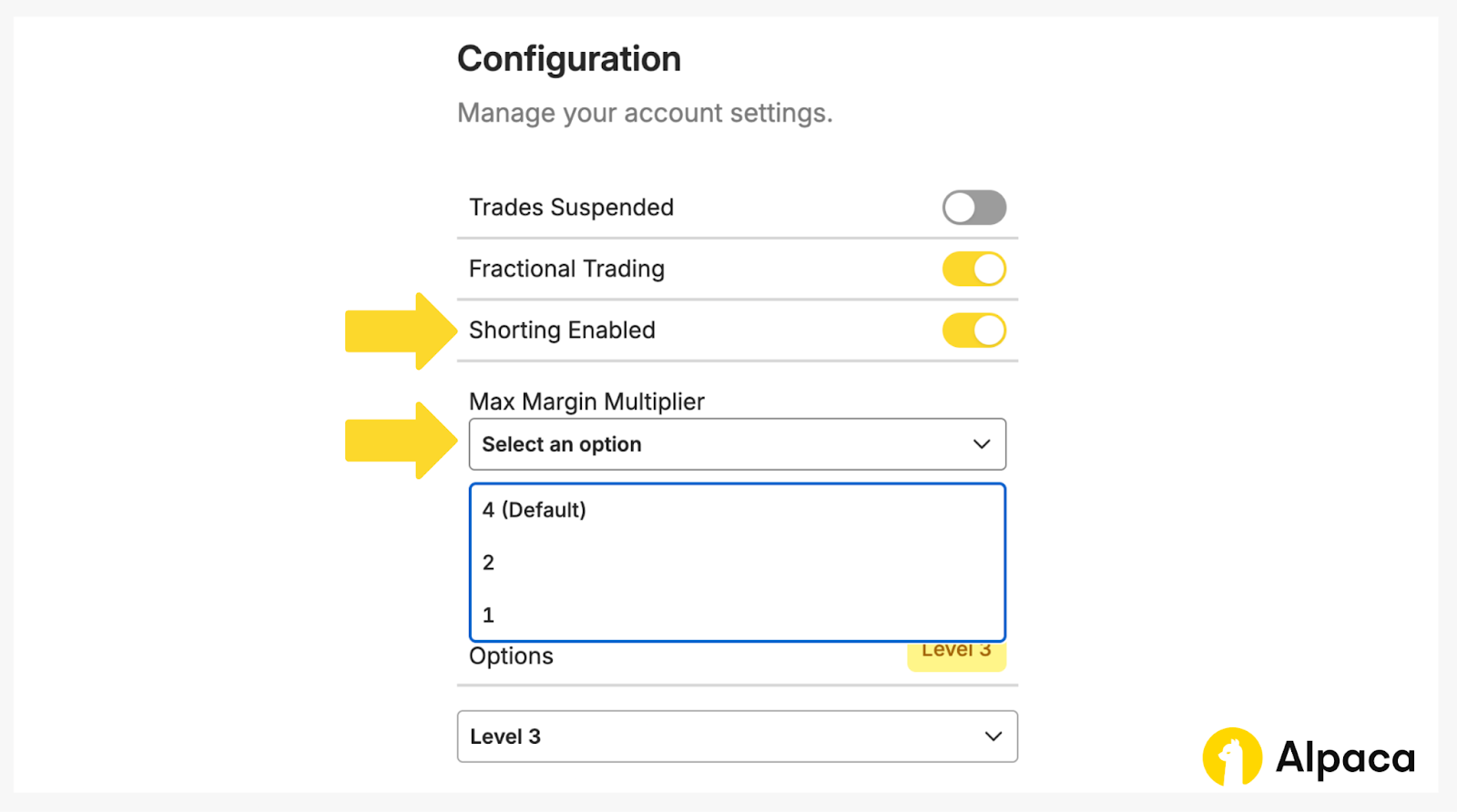
27. Account is not allowed to short (HTTP 403 Error)
If you receive an HTTP 403 error stating the account is not allowed to short, the common reasons include:
- Shorting disabled: The account has no_shorting set to true or shorting_enabled set to false in the account configuration.
- Multiplier set to 1: The account’s
max_margin_multiplieris set to 1, which effectively makes it a cash account. Even ifshorting_enabledappears to be true in some views, a multiplier of 1 typically blocks short selling.
{'response_status_code': 403, 'response_text': { "code": 40310000, "message": "account is not allowed to short" }}To avoid this, confirm on Alpaca’s dashboard that short selling is enabled in the account configuration and that max_margin_multiplier is set above 1, subject to account eligibility and risk approval.
28. Account is not authorized to trade (HTTP 403 Error)
If you the account is not permitted to submit orders (for example, trading is disabled or the account is not in an active trading state).
{'response_status_code': 403, 'response_text': '{"code":40310000, "message": "account is not authorized to trade"}'}Before placing an order, check your account configuration on Alpaca’s dashboard or by calling the get_account endpoint, as shown below.
acct = trade_client.get_account()
print(acct.status)
This would show a response like below.
AccountStatus.ACTIVE29. Account is restricted to liquidation only (HTTP 403 Error)
You may receive a 403 error like the following when the account is set to liquidation only:
{'response_status_code': 403, 'response_text': '{"code":40310000, "message": "account is restricted to liquidation only"}'}This means the account can close existing positions but cannot open new ones. Common issues include:
- ACH Returns: If an ACH return occurs on your account, it will be limited to liquidation only. To remove this restriction, contact us at [email protected].
- PDT Restriction Skip:.If a PDT Restriction Skip was previously granted by our team, allowing a day trade with an account flagged as a Pattern Day Trader (PDT), and the account equity subsequently dropped below $25,000, the account will be restricted to liquidation-only until the minimum equity requirement is met or the 90-day restriction period concludes.
- Compliance/Risk Action: Your account may be temporarily limited based on internal review, account activity, or regulatory requirements.
In this case, check the current account status using the get_account endpoint or review the account configuration in Alpaca’s dashboard and contact us at [email protected].
30. Account is restricted to liquidation only (HTTP 403 Error)
If you receive an HTTP 403 error like the one below, it usually means your order was blocked to prevent your account from being flagged as a Pattern Day Trader (PDT).
{'response_status_code': 403, 'response_text': '{"code": 40310100,
  "message": "trade denied due to pattern day trading protection"}'}
This occurs when your margin account has less than $25,000 in equity and executing the order would result in 4 day trades within 5 business days, triggering the Pattern Day Trader (PDT) flag on the account.
For example:
- You already completed 3 day trades in the last 5 business days and attempted to close a position opened earlier that same day.
- You attempt to open certain same day expiring option contracts that would require closing the position before expiration.
- You attempt a 4th day trade and believe you qualify under the 6% rule, but your total trading activity does not meet the required threshold.
In these situations, the system rejects the order to prevent your account from being restricted under PDT rules. Before placing another order, review your recent day trading activity and current equity on Alpaca’s dashboard or by calling the get_account endpoint:
acct = trade_client.get_account()
print(acct.daytrade_count)
print(acct.equity)
To review further information on this protection and the rules, please review Pattern Day Trading User Protection.
Conclusion
Most Trading API errors fall into a few repeatable buckets: invalid credentials or wrong environment (401), account permissions / subscription restrictions (403), temporary platform issues (5xx), and request validation problems (4xx/422). When you hit an error, start with the HTTP status code and message, validate your request fields against the API reference, and then confirm the account is allowed to perform the action you’re requesting.
If you’re still stuck, capture the full error response (including the x-request-id, when present) and share it with [email protected] so we can help trace the request. For more examples and best practices, continue exploring Alpaca’s learn articles and the API documentation.
To understand more about Alpaca's Trading API capabilities, explore the following resources:
- Alpaca-py GitHub Page
- Alpaca-py Documentation
- Alpaca's Trading API Reference
- How to Trade Options with Alpaca
- How to Backtest 0DTE Options: Strategy, Setup & Performance
- How to Use 24/5 Trading with Alpaca’s Trading API and Dashboard
- How to Connect Your Alpaca Trading API Account with TradingView
- VWAP and TWAP: Optimize Your Orders with Alpaca’s Trading API
Frequently Asked Questions
Why am I getting a 401 Unauthorized error? Am I using the wrong keys or environment?
A 401 Unauthorized error usually means your API key and the endpoint environment do not match. For example, you might be using paper trading keys with the live endpoint, or live keys with the paper endpoint.
- Live endpoint: https://api.alpaca.markets
- Paper endpoint: https://paper-api.alpaca.markets
Make sure your base URL matches the type of key you generated. If you are unsure, regenerate your API key and secret from the correct environment in the dashboard and use that exact pair in your application.
Do I need different Trading API keys for paper and live trading? How can I tell which is which?
Yes. Paper trading and live trading use separate API keys. You generate them from different sections of the dashboard. When creating keys, double check that the environment toggle is set correctly to Paper or Live. Then confirm that your base URL matches the environment of the keys you are using.
If either the keys or the URL do not match, your requests will fail.
Can you confirm whether my Trading API key and secret are valid and correctly matched?
For security reasons, API keys cannot be validated publicly. In most cases, a 401 Unauthorized or 403 Forbidden error means your key and secret do not match, are incorrect, or were deleted.
If you are running code in a Jupyter Notebook, try restarting the kernel to ensure old credentials are not still loaded in memory.
Why does my notional order fail with the message “qty is required”?
This typically happens when you submit a dollar based notional order for a symbol that does not support fractional shares. If a symbol is not fractionable, the system requires a whole share quantity instead of a notional dollar amount. Since fractional trading is not supported for that asset, the order fails and you may see a “qty is required” message.
Check whether the symbol supports fractional trading. If it does not, submit the order using a whole share quantity.
Why am I getting 403 Forbidden even after generating new Trading API keys?
In some cases, invalid or missing credentials may return a 403 Forbidden error instead of a 401 Unauthorized error. If you receive a 403 after generating new keys, confirm that:
- You are using the correct key and secret pair
- The keys were generated in the correct environment
- The base URL matches that environment
If the credentials are mismatched or deleted, the request will be rejected.
Why can't I connect to the market data stream?
Each account is limited to 1 concurrent connection for market data streams. If you try to open more than 1 connection at the same time, you may receive a 406 or 403 error. Close any existing data stream connections before starting a new one.
The content of this article is for general informational purposes only. All examples are for illustrative purposes only. Alpaca does not provide investment, tax, or legal advice. Please consult your own independent advisor as to any investment, tax, or legal statements made herein.
Options trading is not suitable for all investors due to its inherent high risk, which can potentially result in significant losses. Please read Characteristics and Risks of Standardized Options before investing.
Fractional share trading allows a customer to buy and sell fractional share quantities and dollar amounts of certain securities. Fractional share trading presents unique risks and is subject to particular limitations that you should be aware of before engaging in such activity. See Alpaca Customer Agreement at https://alpaca.markets/disclosures for more details.
All investments involve risk and the past performance of a security, or financial product does not guarantee future results or returns. There is no guarantee that any investment strategy will achieve its objectives. Keep in mind that while diversification may help spread risk, it does not assure a profit, or protect against loss. There is always the potential of losing money when you invest in securities, or other financial products. Investors should consider their investment objectives and risks carefully before investing.
Margin trading involves significant risk and is not suitable for all investors. Before considering a margin loan, it is crucial that you carefully consider how borrowing fits with your investment objectives and risk tolerance.
When trading on margin, you assume higher market risk, and potential losses can exceed the collateral value in your account. Alpaca may sell any securities in your account, without prior notice, to satisfy a margin call. Alpaca may also change its “house” maintenance margin requirements at any time without advance written notice. You are not entitled to an extension of time on a margin call. Please review the Firm’s Margin Disclosure Statement before investing.
Orders placed outside regular trading hours (9:30 a.m. – 4:00 p.m. ET) may experience price fluctuations, partial executions, or delays due to lower liquidity and higher volatility. Orders not designated for extended hours execution will be queued for the next trading session. Additionally, fractional trading may be limited during extended hours. For more details, please review Alpaca Extended Hours & Overnight Trading Risk Disclosure.
Securities brokerage services are provided by Alpaca Securities LLC (dba "Alpaca Clearing"), member FINRA/SIPC, a wholly-owned subsidiary of AlpacaDB, Inc. Technology and services are offered by AlpacaDB, Inc.
Cryptocurrency is highly speculative in nature, involves a high degree of risks, such as volatile market price swings, market manipulation, flash crashes, and cybersecurity risks. Cryptocurrency regulations are continuously evolving, and it is your responsibility to understand and abide by them. Cryptocurrency trading can lead to large, immediate and permanent loss of financial value. You should have appropriate knowledge and experience before engaging in cryptocurrency trading. For additional information, please click here.
Cryptocurrency services are made available by Alpaca Crypto LLC ("Alpaca Crypto"), a FinCEN registered money services business (NMLS # 2160858), and a wholly-owned subsidiary of AlpacaDB, Inc. Alpaca Crypto is not a member of SIPC or FINRA. Cryptocurrencies are not stocks and your cryptocurrency investments are not protected by either FDIC or SIPC. Please see the Disclosure Library for more information.
This is not an offer, solicitation of an offer, or advice to buy or sell securities or cryptocurrencies or open a brokerage account or cryptocurrency account in any jurisdiction where Alpaca Securities or Alpaca Crypto, respectively, are not registered or licensed, as applicable.